VIDEO
WHAT IS IT?
RetroArch is a multi-system emulator…kind of. RetroArch is more of a frontend for ‘cores’ which are essentially emulator plugins that run inside RetroArch. It can be quite overwhelming to newcomers but allow me to help make it easy for you!
I love RetroArch. It’s incredibly powerful and feature rich, although it isn’t very user-friendly and does require some learning. I’ve been using it for over a decade and I’m still learning about it to this day.
This guide applies to all platforms. The goal is to get a single game up and running so you’ve got somewhere to start. If you’ve used RetroArch before, there should be a few useful things in here for you too.
LINKS
YOU WILL NEED
ROMs (Your game files) BIOS Files (System dependent)
BIOS FILES
BIOS requirements depend on the core as well as the system. Some cores won’t boot without one, whilst others have a built-in replacement. The table below covers the files mentioned in this guide. There are tonnes of BIOS files available, so check the requirements for the core you’ve chosen before adding them.
| System | Recommended BIOS file(s) |
|---|---|
| PC Engine CD/TurboGrafx-CD | syscard3.pce (CD games; HuCard games don’t need it) |
| Sega CD | bios_CD_U.bin (USA), bios_CD_E.bin (EUR), bios_CD_J.bin (JPN), matching Genesis Plus GX/PicoDrive’s filenames |
| Sega Dreamcast | dc_boot.bin |
| Sega Naomi | naomi.zip |
| Sega Naomi 2 | naomi2.zip |
| Sega Saturn | mpr-17933.bin (USA/EUR), sega_101.bin (JPN) |
| Sony Playstation | psxonpsp660.bin |
| Sony Playstation 2 | ps2-0230a-20080220.bin (USA), ps2-0230e-20080220.bin (EUR), ps2-0230j-20080220.bin (JPN) |
32X games in PicoDrive don’t need the Sega CD BIOS unless you’re playing a Sega CD 32X game. Flycast can use a built-in replacement for some firmware, and Play! doesn’t need a PS2 BIOS. The BIOS setup section explains where your files go and how to check whether your chosen core can find them.
ROM FILE FORMATS
The core comparison table includes file extensions for every core in the catalogue. Search for your system to see what it accepts. The extensions belong to the core as a whole, so a multi-system core may list formats for several different machines.
Compression can save you loads of space, but the format needs to suit the core. CHD is useful for supported disc-based systems. ZIP and 7z support varies; don’t assume that putting a disc image in an archive will make it work. For BIN/CUE games, keep all the tracks together and load the CUE file. Keep arcade ROM sets in the format expected by their core.
SETUP
Welcome to RetroArch!
The first thing you may notice is that the default layout is UGLY! So let’s change that. Head on over to the settings cog and down to Drivers. Then for the menu driver, I recommend either XMB or OZONE.
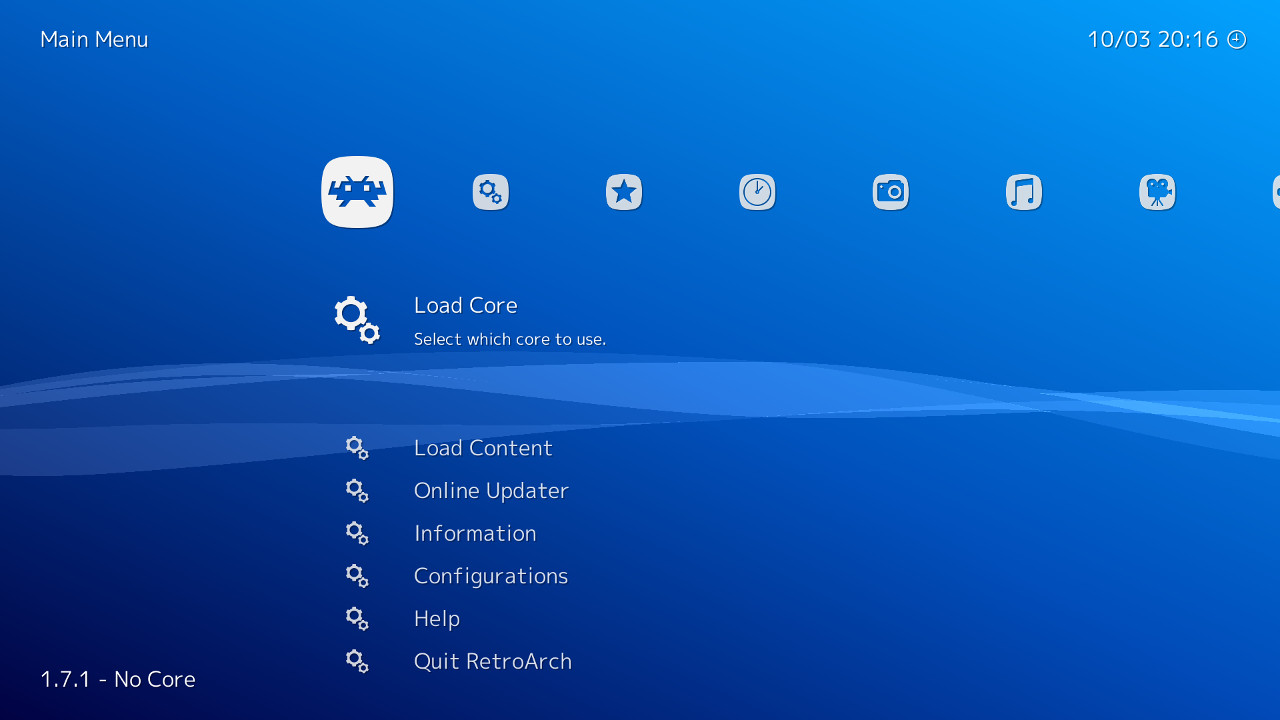
XMB is based on the old PSP/PS3 Xross Media Bar (the pinnacle of UI design). It is my preferred Menu driver for RetroArch, although depending on screen size it may be a little small. But more on that shortly.
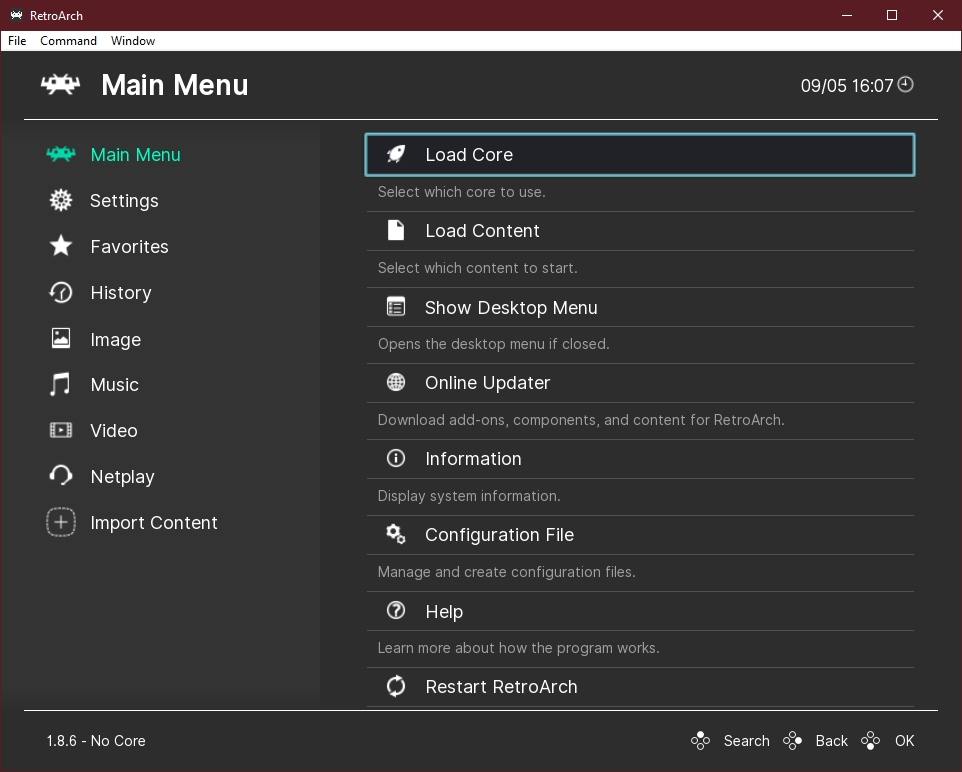
Ozone is also a great UI, its relatively easy to follow and definitely easier on the eyes for those smaller screens.
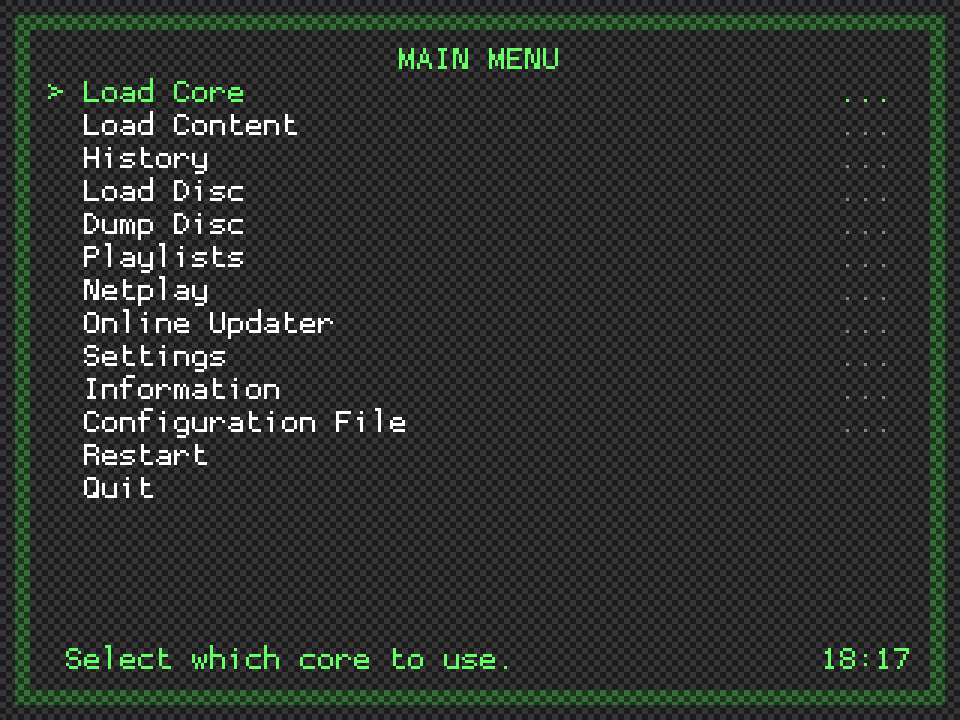
Then there’s RGUI. This one is fine but feels like hacking the terminal in Fallout 3, not one I’d recommend.
Whichever UI you go with is entirely up to you, but for the rest of this guide, I’ll be using XMB. The functionality is the exact same across all layouts. In order for the changes to take effect, we need to fully close and restart RetroArch, but first…
Once that’s done, let’s head back over to the settings menu and work our way through.
SETTINGS
Firstly, if you’re using XMB and think that it looks a little small on your screen, head on over to User Interface, Appearance and adjust the SCALE FACTOR until you’re happy.
Now that’s done, let’s set up our controls.
INPUT
Head on over to Settings > Input > RetroPad Binds > Port 1 Controls. Make sure Device Index shows the controller you want to use, then select Set All Controls and follow the prompts.
RetroArch will configure some controllers automatically, but I recommend going through this yourself just in case. When a prompt gives you a button position, follow that position on your controller. The letters can differ between Nintendo, Xbox and other layouts.
Whilst you’re here, change Analog to Digital Type to Left Analog. This lets you use the left stick for D-pad input, which is useful for older games that only use a D-pad. It won’t give those games analogue movement; pushing the stick sends the same directional input as pressing the D-pad. The regular Left Analog option leaves native analogue input alone when the core supports it.
Menu Controls
Head back to Settings > Input > Menu Controls. Depending on which controller I’m using, I sometimes disable Menu Swap OK and Cancel Buttons, especially with a Nintendo layout. With standard button mappings, turning this off puts confirm on the right face button and cancel on the bottom one. Choose whichever feels right for your controller.
Vibration
Under Settings > Input > Haptic Feedback/Vibration, I enable Enable Device Vibration (For Supported Cores). Whether you get vibration will depend on your device, controller, game and core.
HOTKEYS
Hotkeys let you do things like open the menu or fast-forward whilst you’re playing. Head on over to Settings > Input > Hotkeys and set Hotkey Enable to Select.
You’ll hold Select whilst pressing another button to use its hotkey. For example, Select + right trigger will toggle fast-forward. Press that combination again to go back to normal speed.
Set the following controller bindings. Assign Select to Hotkey Enable, then assign each of the other buttons individually when prompted.
| Setting | Button to assign | Combination during a game |
|---|---|---|
| Hotkey Enable | Select | Hold whilst pressing another hotkey |
| Fast-Forward (Toggle) | Right trigger (R2/RT/ZR) | Select + right trigger |
| Menu Toggle | Top face button (X on Nintendo, Y on Xbox, Triangle on PlayStation) | Select + top face button |
| Close Content | Start | Select + Start |
Close Content closes the current game and leaves RetroArch open. The separate Quit hotkey closes RetroArch itself.
Save States
Save states let you save a snapshot of a game and return to it later. If you want to use them, these are the buttons I’d assign in the same Hotkeys menu:
| Setting | Button to assign | Combination during a game |
|---|---|---|
| Save State | Left shoulder (L1/LB/L) | Select + left shoulder |
| Load State | Right shoulder (R1/RB/R) | Select + right shoulder |
I use Hardcore mode with RetroAchievements, so I don’t personally use these save-state hotkeys. Hardcore mode prevents loading save states. You can still use the game’s own save system.
I also disable Confirm Quit/Close/Reset in the Input settings, although that’s a personal choice. Turning it off means the relevant hotkey acts on the first press, so leave it enabled if you’d prefer the extra confirmation.
Once you’re happy, head back to Main Menu > Configuration File > Save Current Configuration. You nearly forgot, didn’t you?
For more detail, see the official input and controls guide and RetroAchievements guide.
FRAME THROTTLE
Head on over to Settings > Frame Throttle and set Fast-Forward Rate to 4.0x. I use this for games like Pokémon, where I want to speed things up without making them uncontrollable. This sets a limit of roughly four times normal speed, although how fast you can actually go depends on your device and the core.
I also enable Fast-Forward Frameskip here. This skips drawing some frames whilst fast-forwarding, reducing the work needed to display the game.
For the audio, head over to Settings > Audio and enable Fast-Forward Audio Mute. This mutes the game whilst fast-forwarding. With the hotkey we set earlier, hold Select and press the right trigger to toggle fast-forward on or off.
ACHIEVEMENTS
RetroAchievements adds achievements to supported retro games. If you want to use it, create an account over at RetroAchievements, then head to Settings > Achievements in RetroArch. Enable Achievements and enter your username and password.
I enable Hardcore Mode too. This disables things like loading save states, rewind and cheats, so bear that in mind if you want to use the save-state hotkeys from earlier. The game’s own save system still works. Hardcore is my preference, but you can leave it off and still earn achievements.
Under Settings > Achievements > Visibility, I prefer to disable the leaderboard notifications. You can turn off the Leaderboard Start, Submit and Cancel Messages here, along with Leaderboard Trackers if you don’t want the on-screen counters. That’s up to you though; hiding these doesn’t disable the leaderboards themselves.
One thing I do like is a notification sound, so I enable Unlock Sound in the Achievements settings. If an achievement pops in the forest and nobody hears it, did I really earn it?
There’s more on supported cores and setting up your account in the official RetroAchievements guide.
DIRECTORY
Settings > Directory is where you choose the folders RetroArch uses for things like BIOS files and saves. We’ll come back to the BIOS folder when setting up a core that needs it.
Once that’s done, head back to Main Menu > Configuration File > Save Current Configuration. Is it becoming muscle memory yet?
VIDEO DRIVER
Before we get to the Online Updater, head on over to Settings > Drivers > Video. I choose Vulkan or OpenGL depending on the device. This also determines which shader pack we need to download. We’ll cover using shaders in a future guide, but we can get the files ready now.
The video driver is how RetroArch talks to your device’s graphics hardware. OpenGL is the older option, with broad support across devices; on mobile, you’ll usually be using OpenGL ES. Vulkan gives software more direct control over the GPU and can reduce the work the CPU spends on graphics. That can help performance, but Vulkan won’t automatically make every game faster. The device’s drivers and the core matter too. Android’s graphics documentation explains the API differences in more detail.
The names in the menu can be a little confusing. OpenGL has two relevant drivers, and they use different shader formats:
| Video driver | What it’s for | Shader download |
|---|---|---|
vulkan |
Vulkan-capable devices and compatible cores. Some rendering options, such as ParaLLEl-RDP for N64, specifically need it. | Update Slang Shaders (.slangp presets) |
gl |
The traditional OpenGL/OpenGL ES driver, including many older and mobile devices. | Update GLSL Shaders (.glslp presets) |
glcore |
Modern OpenGL core-profile rendering where supported by the build and GPU. | Update Slang Shaders (.slangp presets) |
d3d11 / d3d12 |
Direct3D alternatives on supported Windows builds and hardware. | Update Slang Shaders |
metal |
Apple-specific driver, where available; check the build’s support notes first. | Update Slang Shaders |
These are RetroArch shader formats. Downloading a pack doesn’t apply a shader, and you can keep more than one pack installed if you switch drivers. Once you’ve saved and restarted with your chosen driver, we can update everything.
ONLINE UPDATER
Head to Main Menu > Online Updater. I work through the update options here before setting up my cores. Let each download and extraction finish before moving on to the next one.
The options you see depend on your platform and build. In particular, app-store and Steam builds can handle core installation differently. A missing option doesn’t necessarily mean you’ve done anything wrong.
| Option | What it does and why we’re using it |
|---|---|
| Update Core Info Files | Refreshes the descriptions, accepted file extensions, firmware requirements and other information RetroArch uses to identify cores. This updates the information about the cores, rather than installing the emulators themselves. |
| Update Assets | Downloads menu icons, fonts and other interface assets. If your new XMB menu has missing icons, this is one of the first things to check. |
| Update Controller Profiles | Downloads automatic mappings for recognised controllers. Useful when connecting another controller, even though we’ve already checked our own bindings. |
| Update Databases | Refreshes the game databases used to recognise content during database scans. This helps identify games and build playlists. |
| Update Overlays | Downloads on-screen controls and other overlays. Particularly useful for touch controls on mobile. |
| Update Cheats | Downloads cheat-code files for supported games. Having the files installed doesn’t enable cheats; Hardcore mode restricts their use. |
| Update Slang Shaders | Downloads the shader collection for Vulkan, glcore and other Slang-capable drivers from the table above. |
| Update GLSL Shaders | Downloads shaders for the traditional gl driver. Use this if you’ve chosen that OpenGL/OpenGL ES driver. |
| Update Cg Shaders | Downloads the older Cg collection, if your build exposes it. Cg is deprecated; this is only relevant to a legacy setup that uses it. |
| Update Installed Cores | Updates the cores you’ve already downloaded. On a fresh installation there may be nothing to update yet; run it again after installing cores when you want newer versions. |
The XMB menu map lists the updater’s main entries. You’ll also see downloaders and switches mixed in with the updates:
| Other option | What it’s for |
|---|---|
| Core Downloader | Installs individual emulator cores. We’ll use this next; you don’t need to download every core. |
| Core System Files Downloader | Downloads redistributable support files for selected cores, such as Dolphin’s Sys folder. It isn’t a complete BIOS collection and won’t supply every console’s firmware. |
| Content Downloader | Downloads available homebrew, demos and other freely distributed content. It isn’t a catalogue of commercial console games. |
| Playlist Thumbnails Updater | Downloads artwork for games in an existing playlist. We’ll have a reason to use this once we’ve imported some games. |
| Thumbnails Updater | The older option for downloading a whole system’s artwork collection, if your build shows it. These downloads can be much larger than updating one playlist. |
| On-Demand Thumbnail Downloads | Fetches missing artwork as you browse your playlists. This is a switch, rather than a one-off update. |
| Switch Cores to Play Store Versions | Android Play Store builds only. Replaces eligible cores with store-delivered versions; it isn’t a routine step for a build downloaded from the RetroArch website. |
These updates don’t update the RetroArch app itself. Update that through the store, package manager or download you originally used. Before updating cores you’ve been playing with, save normally inside the game: save states aren’t guaranteed to work across core versions.
DOWNLOADING CORES
Now we can download the emulator for the system you want to play. Head to Main Menu > Online Updater > Core Downloader, find the core and select it. You can also reach the downloader through Main Menu > Load Core > Download a Core on builds that provide it.
For now, choose one system and one core. You can add more later. On Steam, install the available core DLC through Steam; on the iPhone/iPad App Store version, use the bundled cores and update the app for newer ones. The full catalogue below covers more than any one device or store build will offer.
Choosing a Core
There are a lot of these! Search for your system below to compare the options. The whole row has a gold border for a recommended starting point, with the system and any hardware condition written in the row. Some systems have a second recommendation for weaker devices. For specialist machines with only one suitable entry, the gold row points you to that dedicated core; check its limitations before downloading it.
These comparisons come from Libretro’s core catalogue, with recommendations based on the documented features and tradeoffs. They aren’t a claim that I’ve personally tested every core on every device. The list includes all 325 named entries in the checked snapshot, including older versions, game engines and developer tests. A catalogue entry doesn’t guarantee that a downloadable build exists for your platform. Experimental systems may have no recommended row.
The file types are the extensions advertised by each core. They include playlists, executables and support formats as well as ROMs. A matching extension alone doesn’t prove a game will work; arcade games in particular need a ROM set that matches the core. Core names link to the source information for that exact entry.
Showing all 325 cores.
| Core and system | Pros | Cons / things to check | File types |
|---|---|---|---|
| Acorn - BBC Micro (b2)BBC MicroEmulatorRecommended for BBC Micro | Disc swapping; Configurable core options; Software rendering; Can start without loading content. | No save-state support declared; Marked experimental. | .ssd, .dsd |
| Amstrad - CPC/GX4000 (Caprice32)CPC/GX4000EmulatorRecommended for Amstrad CPC / GX4000 | Broad CPC/GX4000 coverage and automatic game launching. | Some games still need a launch command in an M3U playlist. | .dsk, .sna, .zip, .tap, .cdt, .voc, .cpr, .m3u |
| Apple II (AppleWin)IIEmulatorRecommended for Apple II | Dedicated Apple II emulation. | Apple II software and controls need a computer-specific setup; this is not a Macintosh core. | .bin, .do, .dsk, .nib, .po, .gz, .woz, .zip, .2mg, .2img, .iie, .apl, .hdv, .yaml, .m3u |
| Aquaplus - P/ECE (piece-emu)P/ECEEmulatorRecommended for Aquaplus P/ECE | Software rendering. | No save-state support declared. | .pfi |
| Arcade (DICE)Arcade (various)EmulatorRecommended for Supported discrete-logic arcade games | Configurable core options. | No save-state support declared. | .zip, .dmy, .k1, .a1, .6c, .c6, .d2, .s1, .f4, .a4, .1da, .da1, .C4, .4c, .4d, .d7, .d4 |
| Arcade (FinalBurn Neo)Arcade (various)EmulatorRecommended for Arcade / Neo Geo AES and MVS (supported games) | Good arcade starting point with strong RetroArch integration. | Needs matching FBNeo ROM sets; MAME supports additional machines. | .zip, .7z, .cue, .ccd |
| Arcade (HBMAME)Arcade (various)EmulatorRecommended for HBMAME hacks and homebrew | Arcade hacks and homebrew beyond normal MAME sets. | Needs HBMAME sets; use MAME or FBNeo for standard arcade games. | .zip, .chd, .7z, .cmd |
| Arcade (MAME)Arcade (various)EmulatorRecommended for Arcade machines missing from FBNeo | Broad arcade coverage based on current MAME. | ROM sets must match; can be more demanding than FinalBurn Neo. | .cmd, .zip, .7z |
| Arcadia 2001 / Interton VC 4000 (AmiArcadia)Arcadia 2001EmulatorRecommended for Arcadia 2001 / Interton VC 4000 | Arcadia 2001 and related Signetics-based machines. | Several different machines share the core; match the game to its hardware. | .bin, .tvc |
| Arduboy (Arduous)ArduboyEmulatorRecommended for Arduboy | Dedicated Arduboy support. | No save-state support declared. | .hex |
| Atari - 2600 (Stella)Atari 2600EmulatorRecommended for Atari 2600 | Current Stella-based Atari 2600 emulation. | Older Stella branches can be faster on weak hardware. | .a26, .bin |
| Atari - 400/800/600XL/800XL/130XE/5200 (Atari800)Atari 8-bit FamilyEmulatorRecommended for Atari 8-bit computers | Atari 8-bit computers and 5200 in one core. | Machine selection and BIOS configuration need more attention than a5200. | .xfd, .atr, .dcm, .cas, .bin, .a52, .zip, .atx, .car, .rom, .com, .xex, .m3u |
| Atari - 5200 (a5200)Atari 5200EmulatorRecommended for Atari 5200 | Simple Atari 5200 loading on modest hardware. | For Atari computers, use Atari800 instead. | .a52, .bin |
| Atari - 7800 (ProSystem)Atari 7800EmulatorRecommended for Atari 7800 | Dedicated Atari 7800 core with save states. | Only covers the 7800; use Stella for Atari 2600 games. | .a78, .bin, .cdf |
| Atari - Jaguar (Virtual Jaguar)JaguarEmulatorRecommended for Atari Jaguar / Jaguar CD | Jaguar and Jaguar CD, including link-play options. | Some CD images need newer CHD session metadata; performance varies by game. | .j64, .jag, .rom, .abs, .cof, .bin, .prg, .cue, .cdi, .chd |
| Atari - Lynx (Handy)LynxEmulatorRecommended for Atari Lynx | Mature Lynx emulation with screen rotation. | The Lynx’s 75 Hz output can look uneven on a 60 Hz display. | .lnx, .lyx, .o |
| Atari - ST / STE / TT / Falcon (Hatari)Atari ST/STE/TT/FalconEmulatorRecommended for Atari ST / STE / TT / Falcon | Wide Atari ST/STE/TT/Falcon coverage. | Needs a TOS image; 2014 is an older branch. | .st, .msa, .zip, .stx, .dim, .ipf, .vhd, .gem, .ide, .m3u |
| Bandai - Tamagotchi P1 (TamaLIBretro)Tamagotchi P1EmulatorRecommended for Tamagotchi P1 | Emulates first-generation Tamagotchi hardware. | Limited to P1; not a general Tamagotchi-family emulator. | .b, .bin, .rom |
| Bandai - WonderSwan/Color (Beetle Wonderswan)WonderSwan/ColorEmulatorRecommended for WonderSwan / Color | WonderSwan and WonderSwan Color in one core. | Vertical games need the appropriate screen orientation and controls. | .ws, .wsc, .pc2, .pcv2 |
| BBKEmu (BBK Electronic Dictionary)BBK Electronic DictionaryEmulatorRecommended for BBK dictionaries | BBK electronic-dictionary games. | Requires the model’s font and operating-system ROMs. | .gam |
| CHIP-8/S-CHIP/XO-CHIP (JAXE)CHIP-8EmulatorRecommended for CHIP-8 / S-CHIP / XO-CHIP | CHIP-8, S-CHIP and XO-CHIP support. | For CHIP-8-family programs, not commercial console ROMs. | .ch8, .sc8, .xo8 |
| Coleco - ColecoVision / ADAM (Gearcoleco)ColecoVision / ADAMEmulatorRecommended for ColecoVision / ADAM | ColecoVision and ADAM, including SGM and specialist controllers. | ADAM media and unusual controllers need their own configuration. | .col, .cv, .bin, .rom, .zip, .ddp, .dsk, .m3u |
| ColecoVision/CreatiVision/My Vision (JollyCV)ColecoVision/CreatiVision/My VisionEmulatorRecommended for CreatiVision / My Vision | ColecoVision, CreatiVision and My Vision with SGM support. | Different machines need different games and control layouts. | .col, .rom, .myv, .bin |
| Commodore - Amiga (PUAE)AmigaEmulatorRecommended for Amiga | Amiga emulation with good gamepad integration. | Correct Kickstart ROMs improve compatibility over the bundled fallback. | .adf, .adz, .dms, .fdi, .ipf, .hdf, .hdz, .lha, .slave, .info, .cue, .ccd, .nrg, .mds, .iso, .chd, .uae, .m3u, .zip, .7z, .rp9, ./ |
| Commodore - C128 (VICE x128)C128EmulatorRecommended for Commodore 128 | C128 features including its 80-column display and Z80. | C128 modes and keyboard controls add setup compared with a dedicated C64 core. | .d64, .d71, .d80, .d81, .d82, .g64, .g41, .x64, .t64, .tap, .prg, .p00, .crt, .bin, .zip, .gz, .d6z, .d7z, .d8z, .g6z, .g4z, .x6z, .cmd, .m3u, .vfl, .vsf, .nib, .nbz, .d2m, .d4m, ./ |
| Commodore - C64 (VICE x64sc, accurate)C64EmulatorRecommended for Commodore 64 | Accurate, cycle-based C64 graphics emulation. | More demanding than VICE x64 fast. | .d64, .d71, .d80, .d81, .d82, .g64, .g41, .x64, .t64, .tap, .prg, .p00, .crt, .bin, .zip, .gz, .d6z, .d7z, .d8z, .g6z, .g4z, .x6z, .cmd, .m3u, .vfl, .vsf, .nib, .nbz, .d2m, .d4m, ./ |
| Commodore - C64 SuperCPU (VICE xscpu64)C64 SuperCPUEmulatorRecommended for Commodore 64 with SuperCPU | C64 with the SuperCPU accelerator. | Specialist accelerated configuration; use x64sc for a normal C64. | .d64, .d71, .d80, .d81, .d82, .g64, .g41, .x64, .t64, .tap, .prg, .p00, .crt, .bin, .zip, .gz, .d6z, .d7z, .d8z, .g6z, .g4z, .x6z, .cmd, .m3u, .vfl, .vsf, .nib, .nbz, .d2m, .d4m, ./ |
| Commodore - C64DTV (VICE x64dtv)C64DTVEmulatorRecommended for Commodore C64DTV | Emulates C64DTV revisions 2 and 3. | DTV-specific emulation is still incomplete. | .d64, .d71, .d80, .d81, .d82, .g64, .g41, .x64, .t64, .tap, .prg, .p00, .crt, .bin, .zip, .gz, .d6z, .d7z, .d8z, .g6z, .g4z, .x6z, .cmd, .m3u, .vfl, .vsf, .nib, .nbz, .d2m, .d4m, ./ |
| Commodore - CBM-II 5x0 (VICE xcbm5x0)CBM-5x0EmulatorRecommended for Commodore CBM-II 5x0 | Dedicated support for these Commodore models. | Some hardware emulation remains experimental. | .d64, .d71, .d80, .d81, .d82, .g64, .g41, .x64, .t64, .tap, .prg, .p00, .crt, .bin, .zip, .gz, .d6z, .d7z, .d8z, .g6z, .g4z, .x6z, .cmd, .m3u, .vfl, .vsf, .nib, .nbz, .d2m, .d4m, ./ |
| Commodore - CBM-II 6x0/7x0 (VICE xcbm2)CBM-IIEmulatorRecommended for Commodore CBM-II 6x0/7x0 | Covers CBM-II 6x0 and 7x0 computers. | The CBM-II 5x0 family needs the separate xcbm5x0 core. | .d64, .d71, .d80, .d81, .d82, .g64, .g41, .x64, .t64, .tap, .prg, .p00, .crt, .bin, .zip, .gz, .d6z, .d7z, .d8z, .g6z, .g4z, .x6z, .cmd, .m3u, .vfl, .vsf, .nib, .nbz, .d2m, .d4m, ./ |
| Commodore - PET (VICE xpet)PETEmulatorRecommended for Commodore PET | Covers the PET range, including 40- and 80-column models. | Some less-used display timing features are unimplemented. | .d64, .d71, .d80, .d81, .d82, .g64, .g41, .x64, .t64, .tap, .prg, .p00, .crt, .bin, .zip, .gz, .d6z, .d7z, .d8z, .g6z, .g4z, .x6z, .cmd, .m3u, .vfl, .vsf, .nib, .nbz, .d2m, .d4m, ./ |
| Commodore - PLUS/4 (VICE xplus4)PLUS/4EmulatorRecommended for Commodore Plus/4 / C16 | Dedicated support for these Commodore models. | Some hardware emulation remains experimental. | .d64, .d71, .d80, .d81, .d82, .g64, .g41, .x64, .t64, .tap, .prg, .p00, .crt, .bin, .zip, .gz, .d6z, .d7z, .d8z, .g6z, .g4z, .x6z, .cmd, .m3u, .vfl, .vsf, .nib, .nbz, .d2m, .d4m, ./ |
| Commodore - VIC-20 (VICE xvic)VIC-20EmulatorRecommended for VIC-20 | Dedicated VIC-20 hardware emulation. | NTSC interlace mode is not implemented. | .d64, .d71, .d80, .d81, .d82, .g64, .g41, .x64, .t64, .tap, .prg, .p00, .crt, .bin, .zip, .gz, .d6z, .d7z, .d8z, .g6z, .g4z, .x6z, .cmd, .m3u, .vfl, .vsf, .nib, .nbz, .d2m, .d4m, .20, .40, .60, .a0, .b0, .rom, ./ |
| Dingoo A320 / Gemei A330 (DingooEmu)Dingoo A320EmulatorRecommended for Dingoo / Gemei native games | Dingoo A320 and Gemei A330 native game formats. | Does not turn arbitrary emulators bundled on a Dingoo into supported games. | .app, .cc, .c2s, .c3s |
| DOS (DOSBox-Pure)DOSEmulatorRecommended for DOS games | Loads DOS games from ZIPs with gamepad mappings. | Game-focused workflow; DOSBox-core suits more manual configuration. | .zip, .dosz, .exe, .com, .bat, .iso, .chd, .cue, .ins, .img, .ima, .vhd, .jrc, .tc, .m3u, .m3u8, .conf, ./ |
| Elektronika - BK-0010/BK-0011(M)BK-0010/BK-0011(M)ComputerRecommended for Elektronika BK computers | BK-series and related PDP-11 computer emulation. | Much of the original interface and software is in Russian. | .bin |
| Enterprise - 64/128 (ep128emu)128EmulatorRecommended for Enterprise / Videoton TVC | Enterprise and TVC plus CPC and Spectrum variants. | Choose the right machine and firmware; dedicated cores may be simpler for CPC/Spectrum. | .img, .dsk, .tap, .dtf, .com, .trn, .128, .bas, .cas, .cdt, .tzx, .wav, .tvcwav, .. |
| Epoch - Cassette Vision (PD777)Epoch Cassette VisionEmulatorRecommended for Cassette Vision | Configurable core options. | No save-state support declared. | .zip, .bin777, .ptn777 |
| EPOCH/YENO Super Cassette VisionSuper Cassette VisionEmulatorRecommended for Super Cassette Vision | Dedicated Super Cassette Vision emulation. | Super Cassette Vision is different hardware from the original Cassette Vision. | .cart, .bin, .rom, .0, .zip |
| Eternal ComputerEternal ComputerEmulatorRecommended for Eternal Computer | Subleq+ Eternal Computer support. | Specialist computer environment rather than a conventional console. | .capsule, .bootimage |
| Fairchild - ChannelF (FreeChaF)Channel FEmulatorRecommended for Channel F | Lightweight Channel F emulation with gamepad controls. | Requires Channel F BIOS files. | .bin, .chf |
| GAM4980Longman 4980EmulatorRecommended for Longman A4980 | Longman A4980 electronic-dictionary emulation. | Targets this specific dictionary hardware and its software. | .gam |
| GCE - Vectrex (vecx)VectrexEmulatorRecommended for Vectrex | Vectrex with software and hardware rendering options. | Default software resolution is low; higher resolutions cost performance. | .bin, .vec |
| Handheld Electronic (GW)Handheld ElectronicEmulatorRecommended for Game & Watch-style recreations | Easy access to recreated LCD handheld games. | Simulates observed behaviour; not hardware-accurate emulation. | .mgw |
| Infocom Z-Machine (MojoZork)Z-MachineEmulatorRecommended for Z-Machine adventures | Z-Machine text adventures. | Text input is central to these games; a keyboard is useful. | .dat, .z1, .z3 |
| Laserdisc arcade game (DirkSimple)Laserdisc arcade gameEmulatorRecommended for Supported laserdisc games | Plays supported laserdisc arcade games. | Requires the appropriate laserdisc game data and video. | .ogv, .dirksimple |
| Mac II (minivmac)Mac68kEmulatorRecommended for Classic 68k Macintosh | Dedicated Mac68k support. | No save-state support declared. | .dsk, .img, .zip, .hvf, .cmd |
| Magnavox - Odyssey2 / Philips Videopac+ (O2EM)Magnavox Odyssey2 / Philips Videopac+EmulatorRecommended for Odyssey² / Videopac | Dedicated Odyssey² and Videopac emulation. | Needs the system firmware listed in the core information. | .bin |
| Mattel - Intellivision (FreeIntv)IntellivisionEmulatorRecommended for Intellivision | Intellivision in a dedicated core. | Does not emulate Intellivoice or the Entertainment Computer System. | .int, .bin, .rom |
| Mega Duck / Cougar Boy (SameDuck)Mega DuckEmulatorRecommended for Mega Duck | SameBoy-derived Mega Duck emulation. | Targets Mega Duck; use SameBoy for GB/GBC games. | .bin, .duck |
| Mobile - J2ME (FreeJ2ME-Plus)J2MEEmulatorRecommended for Java ME games | Improved Java ME compatibility and Libretro integration. | Needs Java-side setup; game compatibility varies. | .jar, .kjx |
| MSX/SVI/ColecoVision/SG-1000 (blueMSX)MSX/SVI/ColecoVision/SG-1000EmulatorRecommended for MSX / SVI | MSX generations plus SVI, ColecoVision and SG-1000. | Requires the blueMSX Databases and Machines folders. | .rom, .ri, .mx1, .mx2, .dsk, .col, .sg, .sc, .sf, .cas, .m3u |
| Multi (MAME/MESS)Multi (various)EmulatorRecommended for MAME software-list computers and consoles | MAME computer and console coverage. | More complex setup than dedicated console cores; needs matching software lists. | .cmd, .zip, .7z |
| Native32 (Native32Emu)Native32EmulatorRecommended for Sunplus Native32 | Sunplus Native32 files and packaged games. | Requires Native32 software; unrelated console ROMs do not apply. | .smf, .sgm, .ssl, .zip |
| NEC - PC Engine / SuperGrafx / CD (Beetle PCE)PC Engine/SuperGrafx/CDEmulatorRecommended for PC Engine / TurboGrafx-16 / CD / SuperGrafx | Accurate PCE, CD and SuperGrafx support. | More demanding than the Fast and SuperGrafx variants. | .pce, .sgx, .cue, .ccd, .chd, .toc, .m3u |
| NEC - PC-88 series (QUASI88)PC-88 seriesEmulatorRecommended for PC-88 | PC-88 emulation with BIOS/font fallbacks. | Disk swapping uses its own controls rather than the standard disk-control interface. | .d88, .u88, .m3u |
| NEC - PC-98 (Neko Project II Kai)PC-98EmulatorRecommended for PC-98 | Maintained Neko Project II branch for PC-98. | Computer-specific firmware and disk setup can take extra work. | .d98, .zip, .98d, .fdi, .fdd, .2hd, .tfd, .d88, .88d, .hdm, .xdf, .dup, .cmd, .hdi, .thd, .nhd, .hdd, .hdn |
| NEC - PC-FX (Beetle PC-FX)PC-FXEmulatorRecommended for PC-FX | Dedicated Mednafen-based PC-FX support. | Needs PC-FX firmware and correctly prepared disc images. | .cue, .ccd, .toc, .chd |
| Nicai (NicaiEmu)NicaiEmulatorRecommended for Nicai/MStar CBE | Nicai/MStar CBE games. | Restricted to the CBE content format. | .cbe |
| Nintendo - 3DS (Azahar)3DSEmulatorRecommended for Nintendo 3DS (where available) | 3DS emulation based on the Citra family. | Needs decrypted games; some require Mii data. Older or experimental branches differ in compatibility. | .3ds, .3dsx, .z3dsx, .elf, .axf, .cci, .zcci, .cxi, .zcxi, .app |
| Nintendo - DS (melonDS DS)Nintendo DSEmulatorRecommended for Nintendo DS / DSi | DS layouts, upscaling and Wi-Fi emulation; follows standalone melonDS. | DS/DSi firmware and rendering requirements depend on the mode selected. | .nds, .ids, .dsi |
| Nintendo - Game Boy / Color (Gambatte)Game Boy/Game Boy ColorEmulatorRecommended for Game Boy / Game Boy Color (weaker devices) | Fast GB/GBC emulation on modest devices. | SameBoy and Gearboy cover accuracy edge cases better. | .gb, .gbc, .dmg |
| Nintendo - Game Boy / Color (SameBoy)Game Boy/Game Boy ColorEmulatorRecommended for Game Boy / Game Boy Color (capable devices) | Very accurate GB/GBC emulation with link-cable support. | Higher CPU requirements than Gambatte. | .gb, .gbc |
| Nintendo - Game Boy Advance (mGBA)Game Boy/Game Boy Color/Game Boy AdvanceEmulatorRecommended for Game Boy Advance | Good GBA accuracy and compatibility; also loads GB/GBC games. | gpSP can be faster on devices that struggle with mGBA. | .gb, .gbc, .gba |
| Nintendo - GameCube / Wii (Dolphin)GameCube / WiiEmulatorRecommended for GameCube / Wii (where available) | GameCube and Wii games inside RetroArch. | Needs the Dolphin Sys folder; exposes fewer options than standalone Dolphin. | .gcm, .iso, .wbfs, .ciso, .gcz, .elf, .dol, .dff, .tgc, .wad, .rvz, .m3u, .wia |
| Nintendo - NES / Famicom (Mesen)Nintendo Entertainment SystemEmulatorRecommended for NES / Famicom / Famicom Disk System | Accurate NES emulation; supports HD replacement packs. | Needs more CPU power than FCEUmm or QuickNES. | .nes, .fds, .unf, .unif |
| Nintendo - Nintendo 64 (Mupen64Plus-Next)Nintendo 64EmulatorRecommended for Nintendo 64 | N64 with several graphics plugins to suit different games. | Plugin requirements vary; ParaLLEl-RDP needs Vulkan and capable hardware. | .n64, .v64, .z64, .ndd, .bin, .u1 |
| Nintendo - Pokemon Mini (PokeMini)Pokemon MiniEmulatorRecommended for Pokémon Mini | Dedicated Pokémon Mini emulation. | Runs Pokémon Mini games; Game Boy Pokémon games need a Game Boy core. | .min |
| Nintendo - SNES / SFC (Snes9x)Super Nintendo Entertainment SystemEmulatorRecommended for SNES / Super Famicom | Balances SNES compatibility, accuracy and speed. | Older Snes9x snapshots can be faster on very weak devices. | .smc, .sfc, .swc, .fig, .bs, .st |
| Nintendo - Virtual Boy (Beetle VB)Virtual BoyEmulatorRecommended for Virtual Boy | Virtual Boy with several stereoscopic display modes. | Full 3D effects depend on glasses or a suitable display. | .vb, .vboy, .bin |
| Nintendo - Wii U (Cemu)Wii UEmulatorRecommended for Wii U (where available) | Wii U emulation with TV and GamePad screen layouts. | No save states; needs Vulkan or OpenGL 4.5. | .wud, .wux, .wua, .iso, .rpx, .elf, .tmd |
| Oberon RISC EmulatorOberon RISC machineEmulatorRecommended for Oberon RISC | Oberon RISC system for exploring its operating environment. | Designed around a computer interface, not controller-first console games. | .dsk |
| Palm OS (Mu)Palm OSEmulatorRecommended for Palm m515 | Palm m515 hardware emulation. | Palm software needs its own firmware and input workflow. | .prc, .pqa, .img, .pdb, .zip |
| Philips - CDi (SAME CDi)CD-iEmulatorRecommended for Philips CD-i | Dedicated CD-i loading based on newer MAME code. | Still needs compatible CD-i BIOS and disc images. | .chd, .iso, .cue |
| Philips - P2000T (M2000)P2000TEmulatorRecommended for Philips P2000T | Dedicated Philips P2000T emulation. | Targets the P2000T computer and its specific media. | .cas |
| Picocomputer 6502Picocomputer 6502EmulatorRecommended for Picocomputer 6502 | Picocomputer 6502 support. | Requires software written for the RP6502 environment. | .rp6502 |
| RPG Maker 2000/2003 (EasyRPG)RPG Maker 2000/2003 Game EngineGame engineRecommended for RPG Maker 2000/2003 | Plays RPG Maker 2000/2003 and EasyRPG games. | Does not cover later RPG Maker engines; games may need runtime assets. | .ldb, .zip, .lzh, .easyrpg |
| ScummVMScummVM Game EngineGameRecommended for Supported adventure games | Many classic adventure games with a shared interface. | Requires each game’s data files and the correct engine support. | .scummvm |
| Sega - Dreamcast/Naomi (Flycast)Sega DreamcastEmulatorRecommended for Dreamcast / NAOMI / NAOMI 2 / Atomiswave | Dreamcast, NAOMI, NAOMI 2 and Atomiswave support. | Needs suitable graphics support; arcade games need matching ROM sets. | .chd, .cdi, .elf, .bin, .cue, .gdi, .lst, .zip, .dat, .7z, .m3u |
| Sega - Model 3 (Supermodel)Model 3EmulatorRecommended for Sega Model 3 (where available) | Save states; Configurable core options. | Graphics requirement: OpenGL >= 2.1|OpenGL ES >= 3.0. | .zip, .chd, .7z |
| Sega - MS/GG/MD/CD (Genesis Plus GX)Sega 8/16-bit (Various)EmulatorRecommended for Mega Drive / Genesis / Sega CD | Accurate Mega Drive, Sega CD and Sega 8-bit support. | Does not emulate 32X; use PicoDrive for that. | .mdx, .md, .smd, .gen, .bin, .cue, .iso, .sms, .bms, .gg, .sg, .68k, .sgd, .chd, .m3u |
| Sega - MS/GG/MD/CD/32X (PicoDrive)Sega 8/16-bit + 32X (Various)EmulatorRecommended for 32X | Fast Sega emulation including 32X. | Lower accuracy than Genesis Plus GX for systems both support. | .bin, .gen, .smd, .md, .32x, .cue, .iso, .chd, .sms, .gg, .sg, .sc, .m3u, .68k, .sgd, .pco |
| Sega - MS/GG/SG-1000 (Gearsystem)Sega 8-bit (MS/GG/SG-1000)EmulatorRecommended for Master System / Game Gear / SG-1000 | Accurate Master System, Game Gear and SG-1000 support. | Does not cover Mega Drive, Sega CD or 32X. | .sms, .gg, .sg, .mv, .bin, .rom |
| Sega - Saturn (Beetle Saturn)SaturnEmulatorRecommended for Saturn (accuracy; needs a fast CPU) | Accurate Saturn software emulation. | High CPU requirements; no hardware resolution upscaling. | .ccd, .chd, .cue, .toc, .m3u, .zip |
| Sharp - X68000 (PX68k)Sharp X68000EmulatorRecommended for Sharp X68000 | X68000 with direct game loading and a built-in menu. | Computer firmware, disk selection and controls need configuration. | .dim, .img, .d88, .88d, .hdm, .dup, .2hd, .xdf, .hdf, .cmd, .m3u |
| Sharp X1 (X Millennium)Sharp X1ComputerRecommended for Sharp X1 | Sharp X1 emulation. | Needs xmil firmware; opening disk images from its GUI is not working. | .dx1, .zip, .2d, .2hd, .tfd, .d88, .88d, .hdm, .xdf, .dup, .tap, .cmd |
| Sinclair - ZX 81 (EightyOne)ZX81EmulatorRecommended for ZX81 | ZX81 with automatic setup for recognised games. | This port does not include EightyOne’s Spectrum emulation. | .p, .tzx, .t81 |
| Sinclair - ZX Spectrum (Fuse)ZX Spectrum (various)EmulatorRecommended for ZX Spectrum | Wide Spectrum and clone-machine support. | Some clones need extra BIOS files; ZX81 needs EightyOne instead. | .tzx, .tap, .z80, .rzx, .scl, .trd, .dsk, .dck, .sna, .szx, .zip, .ipf |
| SNK - Neo Geo AES/MVS/CD (Geolith)Neo GeoEmulatorRecommended for Neo Geo AES/MVS using .neo files | Neo Geo AES/MVS with a console-style loading workflow. | Uses .neo files; ordinary arcade ZIP sets need a different core. | .neo, .cue, .chd |
| SNK - Neo Geo CD (NeoCD)SNK Neo Geo CDEmulatorRecommended for Neo Geo CD | Dedicated Neo Geo CD with straightforward disc loading. | Needs Neo Geo CD BIOS files; does not replace an AES/MVS core. | .cue, .chd |
| SNK - Neo Geo Pocket / Color (Beetle NeoPop)Neo Geo Pocket (Color)EmulatorRecommended for Neo Geo Pocket / Color | Neo Geo Pocket and Color using the NeoPop lineage. | RACE is a faster fallback if this core struggles on your device. | .ngp, .ngc, .ngpc, .npc |
| Sony - PlayStation (PCSX ReARMed)PlayStationEmulatorRecommended for PlayStation (weaker devices) | Fast PS1 emulation, especially on ARM devices. | No increased internal resolution; NEON variant needs compatible ARM hardware. | .bin, .cue, .img, .mdf, .pbp, .toc, .cbn, .m3u, .ccd, .chd, .iso, .exe |
| Sony - PlayStation (SwanStation)PlayStationEmulatorRecommended for PlayStation (capable devices) | PS1 upscaling, hardware rendering and visual enhancements. | Requires a PS1 BIOS and a supported renderer for hardware features. | .exe, .psexe, .cue, .bin, .img, .iso, .chd, .pbp, .ecm, .mds, .psf, .m3u |
| Sony - PlayStation 2 (LRPS2)Sony PlayStation 2EmulatorRecommended for PlayStation 2 (supported desktop builds) | Broad PS2 compatibility from the PCSX2 family. | LRPS2 is a separate fork; demanding hardware and BIOS setup, limited platform availability. | .elf, .iso, .ciso, .cue, .bin, .gz, .chd, .cso, .zso, .mdf, .nrg, .dump, .img, .m3u |
| Sony - PlayStation Portable (PPSSPP)PSPEmulatorRecommended for PSP | PSP upscaling, texture options and broad graphics support. | Some features need the PPSSPP asset files in the system folder. | .elf, .iso, .cso, .prx, .pbp, .chd |
| Sony - PocketStation (pokketstation)PocketStationEmulatorRecommended for PocketStation | PocketStation emulation using PlayStation memory-card dumps. | Needs PocketStation content on a memory-card image; it does not run PS1 disc games. | .bin, .gme, .mcr, .mcs, .pss |
| SPMP8000 (SPMP8000Emu)SPMP8000EmulatorRecommended for Sunplus SPMP8000 | Sunplus SPMP8000 software support. | Needs software for this specific handheld chipset. | .bin |
| Texas Instruments TI-83 (Numero)TI83EmulatorRecommended for TI-83 calculators | TI-83 emulation with gamepad and mouse input. | Calculator programs need the correct calculator environment. | .8xp, .8xk, .8xg |
| The 3DO Company - 3DO (Opera)3DOEmulatorRecommended for 3DO | Dedicated 3DO implementation continuing 4DO. | Requires a compatible 3DO BIOS. | .iso, .bin, .chd, .cue |
| Thomson - MO/TO (Theodore)Thomson MO/TOEmulatorRecommended for Thomson MO/TO | Thomson MO/TO family with an on-screen keyboard. | Software must match the selected computer model. | .fd, .sap, .k7, .m7, .m5, .rom |
| Uxn / Varvara (zuxn)Uxn / VarvaraEmulatorRecommended for Uxn / Varvara | Runs Uxn/Varvara programs. | Requires software written for the Varvara environment. | .rom |
| Uzebox (Uzem)UzeboxEmulatorRecommended for Uzebox | Emulates the open Uzebox console. | Runs Uzebox software, not ROMs for unrelated 8-bit consoles. | .uze |
| VaporSpecVaporSpecEmulatorRecommended for VaporSpec | Virtual console for original retro-style games. | Needs VaporSpec games; not an emulator for a historical console. | .vaporbin |
| VirtualXTPC/XTEmulatorRecommended for PC/XT | Lightweight PC/XT emulation. | Targets early 8088/V20 hardware, not later DOS PCs. | .img, .zip |
| VM Labs - NUON (Nuance)NUONEmulatorRecommended for NUON (where available) | Dedicated NUON support. | No save-state support declared; Graphics requirement: OpenGL >= 2.1 | OpenGL ES >= 3.0. | .run, .cof, .nuon, .cd, .iso, .img, .chd |
| Watara - Supervision (Potator)SupervisionEmulatorRecommended for Watara Supervision | Dedicated Watara Supervision support. | A specialist handheld core; metadata offers no cross-core performance comparison. | .bin, .sv |
| Wenquxing (WQXEmu)WenquxingEmulatorRecommended for Wenquxing dictionaries | Several Wenquxing dictionary models. | Requires original firmware in a model-specific subfolder. | No content extensions listed; see the core notes. |
| 20482048 Game CloneGame | Self-contained puzzle game with very low requirements. | Plays this game only; not a console emulator. | No content extensions listed; see the core notes. |
| Amstrad - CPC (CrocoDS)CPCEmulator | CPC emulation designed for very weak hardware. | Caprice32 covers a wider CPC/GX4000 range. | .dsk, .sna, .kcr |
| AnarchAnarchGame | Small standalone retro-style shooter. | Its own game rather than a Doom-compatible engine. | No content extensions listed; see the core notes. |
| Arcade (Daphne)Arcade (various)Emulator | Configurable core options; Software rendering. | No save-state support declared; Marked experimental. | .zip |
| Arcade (FB Alpha 2012 CPS-1)CP System IEmulator | Older, smaller arcade option for resource-limited devices. | Requires its matching FBA ROM set; limited variants cover only the named hardware. Prefer FBNeo where possible. | .zip |
| Arcade (FB Alpha 2012 CPS-2)CP System IIEmulator | Older, smaller arcade option for resource-limited devices. | Requires its matching FBA ROM set; limited variants cover only the named hardware. Prefer FBNeo where possible. | .zip |
| Arcade (FB Alpha 2012 CPS-3)CP System IIIEmulator | Older, smaller arcade option for resource-limited devices. | Requires its matching FBA ROM set; limited variants cover only the named hardware. Prefer FBNeo where possible. | .zip |
| Arcade (FB Alpha 2012 Neo Geo)Neo GeoEmulator | Older, smaller arcade option for resource-limited devices. | Requires its matching FBA ROM set; limited variants cover only the named hardware. Prefer FBNeo where possible. | .zip |
| Arcade (FB Alpha 2012)Arcade (various)Emulator | Older, smaller arcade option for resource-limited devices. | Requires its matching FBA ROM set; limited variants cover only the named hardware. Prefer FBNeo where possible. | .iso, .zip, .7z |
| Arcade (FinalBurn Neo) (CPS-1 / CPS-2)CP System I/IIEmulator | Smaller FinalBurn Neo builds for constrained devices. | Only the named hardware subset; use full FBNeo where available. | .zip, .7z |
| Arcade (FinalBurn Neo) (Neo-Geo)Neo GeoEmulator | Smaller FinalBurn Neo builds for constrained devices. | Only the named hardware subset; use full FBNeo where available. | .zip, .7z, .cue, .ccd |
| Arcade (MAME 2000)Arcade (various)Emulator | Older MAME branch useful on hardware that struggles with current MAME. | Requires the ROM set for this exact branch; misses later emulation fixes. | .zip, .7z |
| Arcade (MAME 2003 Midway)Arcade (various)Emulator | Older MAME branch useful on hardware that struggles with current MAME. | Requires the ROM set for this exact branch; misses later emulation fixes. | .zip |
| Arcade (MAME 2003)Arcade (various)Emulator | Older MAME branch useful on hardware that struggles with current MAME. | Requires the ROM set for this exact branch; misses later emulation fixes. | .zip |
| Arcade (MAME 2003-Plus)Arcade (various)Emulator | Older MAME branch useful on hardware that struggles with current MAME. | Requires the ROM set for this exact branch; misses later emulation fixes. | .zip |
| Arcade (MAME 2009)Arcade (various)Emulator | Older MAME branch useful on hardware that struggles with current MAME. | Requires the ROM set for this exact branch; misses later emulation fixes. | .zip, .7z |
| Arcade (MAME 2010)Arcade (various)Emulator | Older MAME branch useful on hardware that struggles with current MAME. | Requires the ROM set for this exact branch; misses later emulation fixes. | .zip, .7z |
| Arcade (MAME 2015)Arcade (various)Emulator | Older MAME branch useful on hardware that struggles with current MAME. | Requires the ROM set for this exact branch; misses later emulation fixes. | .cmd, .zip, .7z |
| Arcade (MAME 2016)Arcade (various)Emulator | Older MAME branch useful on hardware that struggles with current MAME. | Requires the ROM set for this exact branch; misses later emulation fixes. | .cmd, .zip, .7z |
| Arcade (MAME/Arcade)Arcade (various)Emulator | Broad arcade coverage based on current MAME. | ROM sets must match; can be more demanding than FinalBurn Neo. | .cmd, .zip, .7z |
| Arduboy (Ardens)ArduboyEmulator | Arduboy FX simulation with profiling/debugging emphasis. | Developer-oriented features are more than needed for basic Arduboy play. | .hex, .arduboy |
| Atari - 2600 (Stella 2014)Atari 2600Emulator | Older Stella snapshots for constrained platforms. | Miss later compatibility improvements; try current Stella first. | .a26, .bin |
| Atari - 2600 (Stella 2023)Atari 2600Emulator | Older Stella snapshots for constrained platforms. | Miss later compatibility improvements; try current Stella first. | .a26, .bin |
| Atari - 2600 (Tia)Atari 2600Emulator | Atari 2600 with several controller types and cartridge mappers. | Check game and peripheral compatibility against established Stella builds. | .a26, .bin |
| Atari - Lynx (Beetle Lynx)LynxEmulator | Mednafen-derived Lynx emulation. | Older Handy fork; regular Handy is the more practical starting point. | .lnx, .lyx, .bll, .o |
| Atari - Lynx (Gearlynx)LynxEmulator | Lynx alternatives focused on hardware accuracy. | Check game compatibility and performance against Handy on your device. | .lnx, .lyx, .o, .bin |
| Atari - Lynx (Holani)LynxEmulator | Lynx alternatives focused on hardware accuracy. | Check game compatibility and performance against Handy on your device. | .lnx, .o |
| Atari - ST / STE / TT / Falcon (Hatari 2014)Atari ST/STE/TT/FalconEmulator | Wide Atari ST/STE/TT/Falcon coverage. | Needs a TOS image; 2014 is an older branch. | .st, .msa, .zip, .stx, .dim, .ipf, .vhd, .gem, .ide, .m3u |
| Atari - ST/STE/TT/Falcon (hatariB)Atari ST/STE/TT/FalconEmulator | Atari ST family with an included EmuTOS fallback. | A real TOS image is still recommended for compatibility. | .st, .msa, .dim, .stx, .ipf, .ctr, .m3u, .m3u8, .zip, .zst, .gz, .acsi, .ahd, .vhd, .scsi, .shd, .ide, .gem |
| Bennu Game DevelopmentBennu Game DevelopmentGame engine | Configurable core options; Software rendering. | No save-state support declared. | .dcb, .dat, .exe |
| Button TestButton TestTech demo | Checks frontend behaviour or provides an example for core developers. | Development test/demo; not a core for playing console games. | No content extensions listed; see the core notes. |
| CannonballOutrun Game EngineGame engine | Configurable core options; Software rendering; Can start without loading content. | No save-state support declared. | .game, .88 |
| Cave Story (drs)Cave Story Game EngineGame | Configurable core options; Can start without loading content. | No save-state support declared. | .exe, .dll, .so |
| Cave Story (NXEngine)Cave Story Game EngineGame | Software rendering; Can start without loading content. | No save-state support declared. | .exe |
| ChaiLoveChaiLoveGame engine | Runs ChaiScript games using a LOVE-inspired framework. | Games must target ChaiLove’s API. | .chai, .chailove |
| CHIP-8 (Emux CHIP-8)CHIP-8Emulator | Examples of a shared emulator architecture across different machines. | Incomplete development; better suited to research than a first game. | .ch8, .bin, .rom |
| Commodore - Amiga (Amiberry)AmigaEmulator | Optimised UAE-based Amiga emulation. | Needs appropriate Kickstart ROMs. | .adf, .adz, .dms, .fdi, .ipf, .hdf, .hdz, .lha, .slave, .info, .cue, .ccd, .nrg, .mds, .iso, .uae |
| Commodore - Amiga (FS-UAE)AmigaEmulator | Alternative UAE-based Amiga implementation. | PUAE has more complete Libretro and gamepad integration. | .adf, .ipf, .fs-uae |
| Commodore - Amiga (PUAE 2021)AmigaEmulator | Amiga alternatives for weaker hardware. | Older or less accurate than current PUAE. | .adf, .adz, .dms, .fdi, .ipf, .hdf, .hdz, .lha, .slave, .info, .cue, .ccd, .nrg, .mds, .iso, .chd, .uae, .m3u, .zip, .7z, .rp9, ./ |
| Commodore - Amiga (UAE4ARM)AmigaEmulator | Amiga alternatives for weaker hardware. | Older or less accurate than current PUAE. | .adf, .dms, .ipf, .adz, .wrp, .zip, .uae, .lha, .cue, .ccd, .iso, .hdf |
| Commodore - C64 (Frodo)C64Emulator | Dedicated C64 support. | No save-state support declared; Marked experimental. | .d64, .t64, .x64, .p00, .lnx, .lyx, .zip |
| Commodore - C64 (VICE SDL)C64Emulator | Retained as a historical or development reference. | Superseded or incomplete; the source advises against using it to play games. | .d64, .d71, .d80, .d81, .d82, .g64, ., .g41, .x64, .t64, .tap, .prg, .p00, .crt, .bin, .zip, .gz, .d6z, .d7z, .d8z, .g6z, .g4z, .x6z |
| Commodore - C64 (VICE x64, fast)C64Emulator | Faster C64 emulation. | Less precise video emulation than VICE x64sc. | .d64, .d71, .d80, .d81, .d82, .g64, .g41, .x64, .t64, .tap, .prg, .p00, .crt, .bin, .zip, .gz, .d6z, .d7z, .d8z, .g6z, .g4z, .x6z, .cmd, .m3u, .vfl, .vsf, .nib, .nbz, .d2m, .d4m, ./ |
| CruzesCruzesGame | Software rendering; Can start without loading content. | No save-state support declared; Marked experimental. | .game |
| DinothawrDinothawr Game EngineGame | Configurable core options; Software rendering; Can start without loading content. | No save-state support declared. | .game |
| Doom (PrBoom)DOOM Game EngineGame | Doom-family engine with higher frame-rate support. | Requires compatible game WADs; not every modern Doom mod targets this engine. | .wad, .iwad, .pwad, .pk3 |
| Doom 3 (boom3)Doom 3 Game EngineGame engine | Save states; Configurable core options. | Graphics requirement: OpenGL >= 2.0 | OpenGL ES >= 2.0. | .pk4 |
| DOS (DOSBox)DOSEmulator | Familiar traditional DOSBox interface. | Older snapshot; try Pure, core or SVN first. | .exe, .com, .bat, .conf |
| DOS (DOSBox-core)DOSEmulator | Traditional DOSBox with MIDI, OPL3 and MT-32 options. | More setup than DOSBox Pure; some hardware features are experimental. | .exe, .com, .bat, .conf, .cue, .iso, .img, ./ |
| DOS (DOSBox-SVN CE)DOSEmulator | Traditional DOSBox workflow with runtime configuration. | Less automatic than DOSBox Pure for controller-based play. | .exe, .com, .bat, .conf, .cue, .iso |
| DOS (DOSBox-SVN)DOSEmulator | Traditional DOSBox workflow with runtime configuration. | Less automatic than DOSBox Pure for controller-based play. | .exe, .com, .bat, .conf, .cue, .iso, .img, ./ |
| Dungeon Crawl Stone SoupDungeon Crawl Stone SoupGame | Dedicated Dungeon Crawl Stone Soup support. | Marked experimental. | .crawlrc |
| Elektronika Inženjering - Galaksija (Galaksija)GalaksijaEmulator | Software rendering; Can start without loading content. | No save-state support declared; Marked experimental. | .gal |
| EPOCH - Cassette Vision (EmuCV)Cassette VisionEmulator | Software rendering. | No save-state support declared; Marked experimental. | .bin |
| FFmpegFFmpegMedia player | Audio/video playback with visualisation and frame blending. | A media player; does not emulate game systems. | .mkv, .avi, .f4v, .f4f, .3gp, .ogm, .flv, .mp4, .mp3, .flac, .ogg, .m4a, .webm, .3g2, .mov, .wmv, .mpg, .mpeg, .vob, .asf, .divx, .m2p, .m2ts, .ps, .ts, .mxf, .wma, .wav |
| Flashback (REminiscence)Flashback Game EngineGame | Flashback engine accepting several original release formats. | Uses save states rather than regular in-game save files. | .map, .aba, .seq, .lev |
| Game Music EmuMusicMusic player | Plays many extracted video-game music formats. | Dedicated system cores can offer additional sound options or accuracy. | .ay, .gbs, .gym, .hes, .kss, .nsf, .nsfe, .sap, .spc, .vgm, .vgz, .zip |
| GongPong Game CloneGame | Simple Pong-style games. | A single game, not a console core. | No content extensions listed; see the core notes. |
| ImageviewerImageviewerImages | Views image files through RetroArch. | Image viewing only; no game emulation. | .jpg, .jpeg, .png, .bmp, .psd, .tga, .gif, .hdr, .pic, .ppm, .pgm |
| Internet Radio (Radio)Internet Radio PlayerUtility | Configurable core options; Software rendering; Can start without loading content. | No save-state support declared. | .m3u, .txt, .mp3, .wav |
| Java ME (SquirrelJME)Java MEEmulator | Java ME VM including older mobile games. | VM compatibility is not a guarantee that every handset-specific game will work. | .jar, .sqc, .jam, .jad, .kjx, .adf, .sec, .sto, .sp, .sp0, .sp1, .sp2, .sp3, .sp4, .sp5, .sp6, .sp7, .sp8, .sp9 |
| Jump 'n BumpJump 'n BumpGame engine | Software rendering. | No save-state support declared. | .dat |
| LowRes NXLowRes NXGame engine | Software rendering. | No save-state support declared. | .nx |
| Lua Engine (Lutro)LutroGame engine | Runs Lua games using a LOVE-inspired API. | Experimental subset of LOVE; arbitrary LOVE games may not work. | .lutro, .love, .lua |
| Mattel Intellivision (FreeIntvTSOverlay)IntellivisionEmulator | Game-specific Intellivision overlays with touch/mouse input. | Best suited to an overlay workflow; check peripheral support. | .intv, .bin, .rom, .zip |
| McSoftServeC713Emulator | Novelty emulation of a soft-serve machine. | Experimental curiosity, not a console core. | No content extensions listed; see the core notes. |
| Microsoft - MSX (fMSX)MSXEmulator | Dedicated MSX, MSX2 and MSX2+ support. | Needs the relevant MSX firmware files. | .rom, .mx1, .mx2, .dsk, .fdi, .cas, .m3u |
| Microsoft - Xbox (DirectXbox)XboxEmulator | Development reference for original Xbox emulation. | Cannot play games according to its core description. | .iso |
| Microsoft - Xbox (xemu)XboxEmulator | Experimental full original Xbox emulation. | Needs OpenGL 4.0 and several system images; no save states or ports 2–4 yet. | .iso, .xiso |
| MicroW8MicroW8Game engine | Small WebAssembly fantasy-console games. | Loads MicroW8 content rather than general WebAssembly applications. | .uw8, .wasm |
| Minecraft (Craft)Minecraft Game CloneGame | Fast native Minecraft-style sandbox. | Lacks many Minecraft features, including redstone. | No content extensions listed; see the core notes. |
| Mobile - J2ME (FreeJ2ME)J2MEEmulator | Java mobile games inside RetroArch. | FreeJ2ME Plus adds compatibility and integration improvements. | .jar |
| MoonlightMoonlightStreaming client | Streams games from another computer. | Source only reports testing on Lakka for Switch; needs a streaming host. | No content extensions listed; see the core notes. |
| MPVMPVMedia player | Media playback using the MPV backend. | Experimental port; FFmpeg is the more established media core. | .mkv, .avi, .f4v, .f4f, .3gp, .ogm, .flv, .mp4, .mp3, .flac, .ogg, .m4a, .webm, .3g2, .mov, .wmv, .mpg, .mpeg, .vob, .asf, .divx, .m2p, .m2ts, .ps, .ts, .mxf, .wma, .wav |
| Mr.Boom (Bomberman)Mr.BoomGame | Bomberman-style game with multiplayer and computer opponents. | A standalone clone; does not load Bomberman console ROMs. | .desktop |
| Multi (MESS 2015)Multi (various)Emulator | Older multi-system MAME/MESS implementation. | Old 0.160-era base; use current MAME when possible. | .zip, .chd, .7z |
| Multi (UME 2015)Multi (various)Emulator | Older multi-system MAME/MESS implementation. | Old 0.160-era base; use current MAME when possible. | .zip, .chd, .7z |
| NEC - PC Engine / CD (Beetle PCE FAST)PC Engine/PCE-CDEmulator | Low CPU requirements for PC Engine and CD games. | No SuperGrafx; some games work better in the accurate PCE core. | .pce, .cue, .ccd, .chd, .toc, .m3u |
| NEC - PC Engine / SuperGrafx / CD (Geargrafx)PC Engine/SuperGrafxEmulator | Accurate PCE, CD and SuperGrafx support in one core. | Check the CD firmware requirements before loading disc games. | .pce, .sgx, .hes, .cue, .chd, .mmi |
| NEC - PC Engine SuperGrafx (Beetle SuperGrafx)PC Engine SuperGrafxEmulator | Adds SuperGrafx to the faster PCE implementation. | Some accuracy compromises compared with Beetle PCE. | .pce, .sgx, .cue, .ccd, .chd |
| NEC - PC-98 (Neko Project II)PC-98Emulator | Historical PC-98 implementation. | Superseded by Neko Project II Kai. | .d98, .zip, .98d, .fdi, .fdd, .2hd, .tfd, .d88, .88d, .hdm, .xdf, .dup, .cmd, .hdi, .thd, .nhd, .hdd |
| Nintendo - 3DS (Citra 2018)3DSEmulator | 3DS emulation based on the Citra family. | Needs decrypted games; some require Mii data. Older or experimental branches differ in compatibility. | .3ds, .3dsx, .elf, .axf, .cci, .cxi, .app |
| Nintendo - 3DS (Citra Canary/Experimental)3DSEmulator | 3DS emulation based on the Citra family. | Needs decrypted games; some require Mii data. Older or experimental branches differ in compatibility. | .3ds, .3dsx, .elf, .axf, .cci, .cxi, .app |
| Nintendo - 3DS (Citra)3DSEmulator | 3DS emulation based on the Citra family. | Needs decrypted games; some require Mii data. Older or experimental branches differ in compatibility. | .3ds, .3dsx, .elf, .axf, .cci, .cxi, .app |
| Nintendo - 3DS (Panda3DS)3DSEmulator | Alternative 3DS implementation from Panda3DS. | Early development; not a universal replacement for the Citra family. | .3ds, .3dsx, .elf, .axf, .cci, .cxi, .app |
| Nintendo - 3DS (Trident)3DSEmulator | Alternative 3DS implementation from Panda3DS. | Early development; not a universal replacement for the Citra family. | .3ds, .3dsx, .elf, .axf, .cci, .cxi, .app, .ncch |
| Nintendo - DS (DeSmuME 2015)Nintendo DSEmulator | Older DS snapshot that can suit weaker devices. | Misses later DeSmuME improvements. | .nds, .ids, .bin |
| Nintendo - DS (DeSmuME)Nintendo DSEmulator | Mature DS compatibility and resolution upscaling. | Higher resolutions can be demanding. | .nds, .ids, .bin |
| Nintendo - DS (melonDS)Nintendo DSEmulator | DS emulation based on melonDS. | melonDS DS offers a more extensively integrated Libretro port. | .nds, .ids, .dsi |
| Nintendo - DS (NooDS)Nintendo DSEmulator | DS core focused on speed. | Unofficial Libretro port; check game and feature compatibility. | .nds, .gba |
| Nintendo - Game Boy / Color (Boytacean)Game Boy/Game Boy ColorEmulator | Alternative GB/GBC implementations. | Check game compatibility against the more established SameBoy or Gambatte choices. | .gb, .gbc |
| Nintendo - Game Boy / Color (DoubleCherryGB)Game Boy/Game Boy ColorEmulator | Link emulation, network trading and multiplayer link hacks. | A specialist multiplayer choice; SameBoy offers stronger accuracy. | .cgb, .dmg, .gb, .gbc, .sgb |
| Nintendo - Game Boy / Color (Emux GB)Game Boy/Game Boy ColorEmulator | Examples of a shared emulator architecture across different machines. | Incomplete development; better suited to research than a first game. | .gb, .gbc, .bin, .rom |
| Nintendo - Game Boy / Color (fixGB)Game Boy/Game Boy ColorEmulator | Supports colour palettes and some older Game Boy colourisation hacks. | Preliminary implementation; SameBoy, Gambatte or Gearboy are more mature. | .gb, .gbc, .gbs |
| Nintendo - Game Boy / Color (Gearboy)Game Boy/Game Boy ColorEmulator | Accurate GB/GBC emulation for modern devices. | Gambatte is a useful fallback on weaker hardware. | .gb, .dmg, .gbc, .cgb, .sgb |
| Nintendo - Game Boy / Color (IroGB)Game Boy/Game Boy ColorEmulator | Alternative GB/GBC implementations. | Check game compatibility against the more established SameBoy or Gambatte choices. | .gb, .gbc, .dmg, .cgb |
| Nintendo - Game Boy / Color (TGB Dual)Game Boy/Game Boy ColorEmulator | Runs two linked Game Boys; modest hardware needs. | SameBoy offers more accurate emulation on capable hardware. | .cgb, .dmg, .gb, .gbc, .sgb |
| Nintendo - Game Boy Advance (Beetle GBA)Game Boy AdvanceEmulator | Another software-rendered GBA implementation. | Older VBA-derived core; mGBA is a better general starting point. | .gba, .agb, .bin |
| Nintendo - Game Boy Advance (gpSP)Game Boy AdvanceEmulator | Fast GBA emulation on low-powered hardware. | Some games have compatibility issues; try mGBA first if it runs well. | .gba, .bin |
| Nintendo - Game Boy Advance (Meteor)Game Boy AdvanceEmulator | Retained as a historical or development reference. | Superseded or incomplete; the source advises against using it to play games. | .gba |
| Nintendo - Game Boy Advance (TempGBA)Game Boy AdvanceEmulator | GBA optimisations specifically for the PSP. | Device-specific fork; use mGBA or regular gpSP elsewhere. | .gba, .bin, .agb, .gbz |
| Nintendo - Game Boy Advance (VBA Next)Game Boy AdvanceEmulator | Lower requirements than VBA-M. | Older code; tilt and solar-sensor games can have problems. | .gba |
| Nintendo - Game Boy Advance (VBA-M)Game Boy/Game Boy Color/Game Boy AdvanceEmulator | Supports GBA, GB/GBC and Super Game Boy colours and borders. | VBA Next can be faster, at the cost of older emulation code. | .dmg, .gb, .gbc, .cgb, .sgb, .gba |
| Nintendo - Game Boy/GBA/NDS (SkyEmu)Nintendo - Game Boy/GBA/NDS (SkyEmu)Emulator | Several Nintendo handhelds in one emulator. | Check the core’s extension list and game compatibility before replacing dedicated cores. | .gb, .gbx, .gba, .nds |
| Nintendo - GameCube / Wii (Dolphin Launcher)GameCube / WiiLauncher | Launches standalone Dolphin with its full feature set. | Runs outside RetroArch; RetroArch shaders and other frontend features do not apply. | .elf, .dol, .gcm, .iso, .wbfs, .ciso, .gcz, .wad |
| Nintendo - GameCube / Wii (Ishiiruka)GameCube / WiiEmulator | Performance-oriented Dolphin fork. | Trades accuracy for speed; standard Dolphin is a better general starting point. | .gcm, .iso, .wbfs, .ciso, .gcz, .elf, .dol, .dff, .tgc, .wad |
| Nintendo - NES / Famicom (bnes)Nintendo Entertainment SystemEmulator | Retained as a historical or development reference. | Superseded or incomplete; the source advises against using it to play games. | .nes |
| Nintendo - NES / Famicom (Emux NES)Nintendo Entertainment SystemEmulator | Examples of a shared emulator architecture across different machines. | Incomplete development; better suited to research than a first game. | .nes, .bin, .rom |
| Nintendo - NES / Famicom (FCEUmm)Nintendo Entertainment SystemEmulator | Fast NES emulation, including unusual cartridge mappers. | Mesen is the stronger accuracy-focused option on capable hardware. | .fds, .nes, .unif, .unf |
| Nintendo - NES / Famicom (fixNES)Nintendo Entertainment SystemEmulator | Small NES implementation useful for learning about emulation. | Alpha-stage core; choose a mature NES core for general play. | .nes, .fds, .qd, .nsf |
| Nintendo - NES / Famicom (nes)Nintendo Entertainment SystemEmulator | Small NES implementation ported from 9front. | Metadata supplies little compatibility guidance; start with a mature NES core. | .nes |
| Nintendo - NES / Famicom (Nestopia)Nintendo Entertainment SystemEmulator | Accurate NES emulation with broad game compatibility. | FCEUmm or QuickNES may suit weaker devices better. | .nes, .fds, .unf, .unif, .nsf |
| Nintendo - NES / Famicom (QuickNES)Nintendo Entertainment SystemEmulator | Very low CPU requirements. | Trades some accuracy for speed; use when faster alternatives are needed. | .nes |
| Nintendo - NES / Famicom (RustyNES)Nintendo Entertainment SystemEmulator | NES with deterministic states, disk swapping and mapper coverage. | Accuracy-focused design; check speed on weaker devices. | .nes, .fds |
| Nintendo - NES / FC / FDS / SNES / SFC / GB / GBC / GBA / NEC - PCE / PCE-CD / Sega - SMS / GG / Bandai - Wswan (MesenCE)Nintendo Entertainment System / Super Nintendo Entertainment System / Game Boy / Game Boy Color / PC Engine SuperGrafx / PC Engine - TurboGrafx 16 / PC Engine CD - TurboGrafx-CD / WonderSwan / WonderSwan ColorEmulator | Accurate emulation across several Nintendo, NEC and Bandai systems. | A larger scope than a dedicated single-system core; check firmware for each system. | .sfc, .smc, .fig, .swc, .bs, .gb, .gbc, .gba, .pce, .cue, .nes, .sms, .fc, .fds, .unf, .unif, .ws, .wsc, .pc2, .pcv2, .sms, .gg, .sg, .mv |
| Nintendo - Nintendo 64 (Mupen64Plus-Next Develop)Nintendo 64Emulator | Development branch with newer N64 changes. | Less suitable than the standard branch for a first setup. | .n64, .v64, .z64, .ndd, .bin, .u1 |
| Nintendo - Nintendo 64 (Mupen64Plus-Next GLES2)Nintendo 64Emulator | N64 build targeting older OpenGL ES 2 devices. | Graphics capabilities are restricted compared with modern builds. | .n64, .v64, .z64, .ndd, .bin, .u1 |
| Nintendo - Nintendo 64 (Mupen64Plus-Next GLES3)Nintendo 64Emulator | N64 build for OpenGL ES 3 devices. | Requires ES 3 support; demanding plugins may still be too slow. | .n64, .v64, .z64, .ndd, .bin, .u1 |
| Nintendo - Nintendo 64 (ParaLLEl N64)Nintendo 64Emulator | Legacy N64 graphics plugins can suit older devices. | Mupen64Plus-Next is the general starting point; debug build is for investigation. | .n64, .v64, .z64, .bin, .u1, .ndd |
| Nintendo - Nintendo 64 (ParaLLEl) (Debug)Nintendo 64Emulator | Legacy N64 graphics plugins can suit older devices. | Mupen64Plus-Next is the general starting point; debug build is for investigation. | .n64, .v64, .z64, .bin, .u1, .ndd |
| Nintendo - SNES / Famicom (higan Accuracy)Super Nintendo Entertainment SystemEmulator | Preserves an older higan-based SNES implementation. | Newer bsnes offers a more useful starting point for most players. | .sfc, .smc, .gb, .gbc, .bml, .rom |
| Nintendo - SNES / SFC (Beetle bsnes)Super Nintendo Entertainment SystemEmulator | Historical Mednafen/bsnes SNES implementation. | Superseded for speed and accuracy; use Snes9x or a newer bsnes core. | .smc, .fig, .bs, .st, .sfc |
| Nintendo - SNES / SFC (Beetle Supafaust)Super Nintendo Entertainment SystemEmulator | Fast SNES emulation, especially on ARM, with deterministic states. | Designed for speed with some accuracy tradeoffs; compare demanding games with bsnes. | .smc, .fig, .sfc, .gd3, .gd7, .dx2, .bsx, .swc |
| Nintendo - SNES / SFC (bsnes 2014 Accuracy)Super Nintendo Entertainment SystemEmulator | Detailed dot-level SNES graphics emulation in an older branch. | Older snapshot with high CPU requirements; modern bsnes is usually preferable. | .sfc, .smc, .bml, .gb, .gbc, .st, .bs |
| Nintendo - SNES / SFC (bsnes 2014 Balanced)Super Nintendo Entertainment SystemEmulator | Faster scanline graphics emulation than the Accuracy variants. | Older snapshot; loses precision needed by some games. | .sfc, .smc, .bml, .gb, .gbc, .st, .bs |
| Nintendo - SNES / SFC (bsnes 2014 Performance)Super Nintendo Entertainment SystemEmulator | Fastest graphics implementation in these older bsnes branches. | No CX4 support for Mega Man X2/X3; Snes9x is usually a better speed choice. | .sfc, .smc, .bml, .gb, .gbc, .st, .bs |
| Nintendo - SNES / SFC (bsnes C++98 (v085))Super Nintendo Entertainment SystemEmulator | Builds on platforms restricted to older C++ compilers. | Old performance profile; choose a newer SNES core where available. | .sfc, .smc, .gb, .gbc, .st, .bs |
| Nintendo - SNES / SFC (bsnes)Super Nintendo Entertainment SystemEmulator | Accurate SNES emulation, enhanced Mode 7 and Super FX options. | Needs a relatively fast CPU; source lists no RetroAchievements support. | .smc, .sfc, .swc, .fig, .gb, .gbc, .bs |
| Nintendo - SNES / SFC (bsnes-hd beta)Super Nintendo Entertainment SystemEmulator | Experimental widescreen and visual enhancements. | Beta features can introduce problems; demanding CPU requirements. | .smc, .sfc, .swc, .fig, .gb, .gbc, .bs |
| Nintendo - SNES / SFC (bsnes-jg)Super Nintendo Entertainment SystemEmulator | Accurate SNES emulation with achievements and add-on support. | Still more demanding than Snes9x. | .smc, .sfc, .st, .gb, .gbc, .bs |
| Nintendo - SNES / SFC (bsnes-mercury Accuracy)Super Nintendo Entertainment SystemEmulator | Detailed dot-level SNES graphics emulation in an older branch. | Older snapshot with high CPU requirements; modern bsnes is usually preferable. | .sfc, .smc, .bml, .gb, .gbc, .st, .bs |
| Nintendo - SNES / SFC (bsnes-mercury Balanced)Super Nintendo Entertainment SystemEmulator | Faster scanline graphics emulation than the Accuracy variants. | Older snapshot; loses precision needed by some games. | .sfc, .smc, .bml, .gb, .gbc, .st, .bs |
| Nintendo - SNES / SFC (bsnes-mercury Performance)Super Nintendo Entertainment SystemEmulator | Fastest graphics implementation in these older bsnes branches. | No CX4 support for Mega Man X2/X3; Snes9x is usually a better speed choice. | .sfc, .smc, .bml, .gb, .gbc, .st, .bs |
| Nintendo - SNES / SFC (ChimeraSNES)Super Nintendo Entertainment SystemEmulator | Snes9x 2005-derived speed with improved sound. | Older emulation base; modern Snes9x has later compatibility fixes. | .smc, .fig, .sfc, .gd3, .gd7, .dx2, .bsx, .bs, .swc, .st |
| Nintendo - SNES / SFC (nSide Balanced)Super Nintendo Entertainment SystemEmulator | Preserves an older higan-based SNES implementation. | Newer bsnes offers a more useful starting point for most players. | .sfc, .smc, .gb, .gbc, .bml, .rom |
| Nintendo - SNES / SFC (Snes9x 2002)Super Nintendo Entertainment SystemEmulator | Older Snes9x branch with lower hardware requirements. | Trades later accuracy and compatibility fixes for speed; try current Snes9x first. | .smc, .fig, .sfc, .gd3, .gd7, .dx2, .bsx, .swc |
| Nintendo - SNES / SFC (Snes9x 2005 Plus)Super Nintendo Entertainment SystemEmulator | Older Snes9x branch with lower hardware requirements. | Trades later accuracy and compatibility fixes for speed; try current Snes9x first. | .smc, .fig, .sfc, .gd3, .gd7, .dx2, .bsx, .swc |
| Nintendo - SNES / SFC (Snes9x 2005)Super Nintendo Entertainment SystemEmulator | Older Snes9x branch with lower hardware requirements. | Trades later accuracy and compatibility fixes for speed; try current Snes9x first. | .smc, .fig, .sfc, .gd3, .gd7, .dx2, .bsx, .swc |
| Nintendo - SNES / SFC (Snes9x 2010)Super Nintendo Entertainment SystemEmulator | Older Snes9x branch with lower hardware requirements. | Trades later accuracy and compatibility fixes for speed; try current Snes9x first. | .smc, .fig, .sfc, .gd3, .gd7, .dx2, .bsx, .swc |
| Nintendo - SNES / SFC / Game Boy / Color (Mesen-S)Super Nintendo Entertainment System / Game Boy / Game Boy ColorEmulator | Accurate SNES/GB/GBC with Super Game Boy and achievements. | A separate branch from the broader Mesen2 core; choose based on the systems needed. | .sfc, .smc, .fig, .swc, .bs, .gb, .gbc |
| Nokia - Symbian / N-Gage (EKA2L1)Symbian OS / N-GageEmulator | Dedicated Symbian OS / N-Gage support. | No save-state support declared; Marked experimental. | .sis, .sisx, .n-gage, .eka2l1 |
| OmicronOmicronGame engine | Java fantasy-console games in cartridge form. | Experimental; needs a Java runtime and OpenGL/ES. | .omicron |
| ONScripterONScripterGame engine | Runs compatible visual-novel game scripts. | Requires original game assets and compatibility with this script engine. | .txt, .dat, .___, .ons, ./ |
| ONScripter YuriONScripter YuriGame engine | Runs compatible visual-novel game scripts. | Requires original game assets and compatibility with this script engine. | .txt, .dat, .___, .nt2, .nt3, .ons, ./ |
| PascalPongPascalPongGame | Simple Pong-style games. | A single game, not a console core. | .game |
| PC (PCem)PCEmulator | Emulates PC hardware rather than just a DOS game environment. | Preliminary port; DOSBox is a more practical first choice. | .exe, .com, .bat, .conf |
| Philips CDi (CDi 2015)CD-iEmulator | Simple CD-i loading from CHD files. | Older MAME-derived code; BIOS is required. | .chd |
| PICO-8 (FAKE-08)PICO-8Emulator | Save states; Software rendering. | Marked experimental. | .p8, .png |
| PICO-8 (Retro8)PICO-8Emulator | Loads PICO-8 carts and cartridge PNGs. | Incomplete PICO-8 behaviour, including some Lua and arithmetic details. | .p8, .png |
| PocketCDGMusicKaraoke player | Dedicated Music support. | No save-state support declared. | .cdg |
| PSP RemotePlay (RemoteJoy)PSPStreaming | Retained as a historical or development reference. | Superseded or incomplete; the source advises against using it to play games. | No content extensions listed; see the core notes. |
| PuzzleScript (pzretro)PuzzleScriptGame engine | PuzzleScript and PuzzleScript Plus games. | Only games made for these engines are supported. | .pz, .pzp |
| QEMUQEMUEmulator | Software rendering. | No save-state support declared; Marked experimental. | .qemu_cmd_line, .iso, .img, .qcow, .qcow2 |
| Quake (TyrQuake)Quake Game EngineGame | Configurable core options; Software rendering. | No save-state support declared. | .pak |
| Quake II (vitaQuake 2)Quake II Game EngineGame | Dedicated Quake II Game Engine support. | No save-state support declared. | .pak |
| Quake II - Ground Zero (vitaQuake 2 [Rogue])Quake II Game EngineGame | Dedicated Quake II Game Engine support. | No save-state support declared. | .pak |
| Quake II - The Reckoning (vitaQuake 2 [Xatrix])Quake II Game EngineGame | Dedicated Quake II Game Engine support. | No save-state support declared. | .pak |
| Quake II - Zaero (vitaQuake 2 [Zaero])Quake II Game EngineGame | Dedicated Quake II Game Engine support. | No save-state support declared. | .pak |
| Quake III: Arena (vitaQuake 3)Quake 3 Game EngineGame | Dedicated Quake 3 Game Engine support. | No save-state support declared. | .pk3 |
| Redbook Audio PlayerRedbookmusic | Software rendering. | No save-state support declared. | .cue, .bin |
| Rick Dangerous (XRick)Rick Dangerous Game EngineGame | Can start without loading content. | No save-state support declared. | .zip |
| ROM CleanerROM CleanerUtility | ROM-file utility listed in the catalogue. | A utility rather than an emulator; read its source before using it on files. | .sfc, .smc, .st, .swc, .bs, .cgb, .dmg, .gb, .gbc, .sgb, .a52, .nes, .3ds, .3dsx, .cart, .rom, .sms, .bms, .int, .col, .cv, .md, .mdx, .smd, .gen, .gg, .sg, .gba, .nds, .lnx, .lyx, .pce, .sgx, .ws, .wsc, .vb, .vboy, .n64, .z64, .v64, .vec |
| RPG Maker XP/VX/VX Ace (mkxp-z)RPG Maker XP/VX/VX Ace Game EngineGame engine | Plays some RPG Maker XP/VX/VX Ace games. | Compatibility depends on game scripts and extensions. | .ini, .json, .rxproj, .rvproj, .rvproj2, .mkxpz, .zip, .7z |
| RVVMRVVMVirtual machine | Dedicated RVVM support. | Marked experimental. | .rvvm |
| SAM Coupe (SimCoupe)SAM coupeEmulator | Dedicated SAM coupe support. | No save-state support declared; Marked experimental. | .dsk, .mgt, .sbt, .sad |
| SDLPALSDLPALGame | Software rendering; Can start without loading content. | No save-state support declared. | .cfg |
| Sega - Dreamcast (RetroDream)Sega DreamcastEmulator | Preserves the last open-source Redream branch. | Misses later Redream features; Flycast is usually a better choice. | .gdi, .chd, .cdi |
| Sega - Dreamcast/Naomi (Flycast GLES2)Sega DreamcastEmulator | Flycast variant for older OpenGL ES 2 GPUs. | Prefer normal Flycast on modern GPUs; advanced graphics options are limited. | .chd, .cdi, .iso, .elf, .bin, .cue, .gdi, .lst, .zip, .dat, .7z, .m3u |
| Sega - Master System (Emux SMS)Sega Master SystemEmulator | Examples of a shared emulator architecture across different machines. | Incomplete development; better suited to research than a first game. | .sms, .bms, .bin, .rom |
| Sega - MD/CD (ClownMDEmu)Sega GenesisEmulator | Portable Sega emulation focused on speed and accuracy. | Check system and game support against Genesis Plus GX or PicoDrive. | .bin, .md, .gen, .cue, .iso, .chd |
| Sega - MS/GG (SMS Plus GX)Sega 8-bitEmulator | Dedicated Sega 8-bit settings separate from Mega Drive. | Genesis Plus GX covers more Sega systems in one core. | .sms, .bin, .rom, .col, .gg, .sg |
| Sega - MS/GG/MD/CD (Genesis Plus GX Wide)Sega 8/16-bit (Various)Emulator | Adds widescreen hacks to Genesis Plus GX. | Some games show broken graphics outside the original screen; no 32X. | .mdx, .md, .smd, .gen, .bin, .cue, .iso, .sms, .bms, .gg, .sg, .68k, .sgd, .chd, .m3u |
| Sega - MS/GG/MD/CD/32X (BlastEm)Sega 8/16-bit (Various)Emulator | Accuracy-focused Sega emulation, including demanding demos. | Less mature than Genesis Plus GX; availability differs by build. | .md, .gen, .smd, .68k, .sgd, .32x, .sms, .gg, .sg, .sg1, .sc, .sc3, .sf7, .col, .cue, .toc, .iso, .chd, .vgm, .vgz, .flac, .wav, .bin, .rom, .gz |
| Sega - Saturn (Beetle Saturn Super)SaturnEmulator | Accurate Saturn software emulation. | High CPU requirements; no hardware resolution upscaling. | .ccd, .chd, .cue, .toc, .m3u, .zip |
| Sega - Saturn (Emir)SaturnEmulator | Modern Saturn implementation focused on accuracy. | Still developing; compatibility continues to change. | .cue, .chd, .mds, .ccd, .iso, .m3u |
| Sega - Saturn (YabaSanshiro)SaturnEmulator | Faster Saturn emulation with upscaling. | Accuracy compromises; the Libretro docs flag this port as unmaintained. | .bin, .ccd, .chd, .cue, .iso, .mds, .zip |
| Sega - Saturn (Yabause)SaturnEmulator | Alternative Saturn software renderer. | Neither the accuracy nor visual features of newer Saturn options. | .bin, .ccd, .chd, .cue, .iso, .mds, .zip, .m3u |
| Sega - Saturn/ST-V (Kronos)SaturnEmulator | Saturn and ST-V emulation with increased internal resolution. | Needs a capable GPU; less accurate than Beetle Saturn. | .ccd, .chd, .cue, .iso, .mds, .zip, .m3u |
| SNK - Neo Geo Pocket / Color (RACE)Neo Geo Pocket (Color)Emulator | Fast Neo Geo Pocket emulation for weaker hardware. | Beetle NeoPop is the more accuracy-focused option. | .ngp, .ngc, .ngpc, .npc |
| Sony - PlayStation (Beetle PSX HW)PlayStationEmulator | Accurate PS1 base with hardware rendering and upscaling. | More demanding than ReARMed; renderer support matters. | .cue, .toc, .m3u, .ccd, .exe, .pbp, .chd, .bin |
| Sony - PlayStation (Beetle PSX)PlayStationEmulator | Accuracy-focused PS1 software rendering. | CPU intensive; use the HW variant for hardware visual enhancements. | .cue, .toc, .m3u, .ccd, .exe, .pbp, .chd, .bin |
| Sony - PlayStation (DuckStation)PlayStationEmulator | PS1 upscaling, hardware rendering and visual enhancements. | Requires a PS1 BIOS and a supported renderer for hardware features. | .exe, .psexe, .cue, .bin, .img, .iso, .chd, .pbp, .ecm, .mds, .psf, .m3u |
| Sony - PlayStation (PCSX ReARMed) [Interpreter]PlayStationEmulator | PS1 option where dynamic recompilation is unavailable. | Slower than the normal ReARMed build; no resolution upscaling. | .bin, .cue, .img, .mdf, .pbp, .cbn, .toc, .chd |
| Sony - PlayStation (PCSX ReARMed) [NEON]PlayStationEmulator | Fast PS1 emulation, especially on ARM devices. | No increased internal resolution; NEON variant needs compatible ARM hardware. | .bin, .cue, .img, .mdf, .pbp, .toc, .cbn, .m3u, .chd |
| Sony - PlayStation (PCSX1)PlayStationEmulator | Retained as a historical or development reference. | Superseded or incomplete; the source advises against using it to play games. | .bin, .cue, .img, .mdf, .pbp, .toc, .cbn, .m3u |
| Sony - PlayStation (Rustation)PlayStationEmulator | Dedicated PlayStation support. | Marked experimental; Graphics requirement: OpenGL Core >= 3.3. | .cue, .toc, .m3u, .ccd, .exe |
| Sony - PlayStation 2 (ARMSX2)Sony PlayStation 2Emulator | PS2 port aimed at ARM64, with renderer and upscale options. | Needs compatible graphics, a PS2 BIOS and resources; check availability for your device. | .elf, .iso, .ciso, .chd, .cso, .zso, .bin, .mdf, .nrg, .dump, .gz, .img, .irx, .m3u |
| Sony - PlayStation 2 (PCEE2)Sony PlayStation 2Emulator | Tracks modern PCSX2 code. | Experimental Libretro port; needs PS2 BIOS and resources. | .iso, .chd, .cso, .zso, .gz, .bin, .mdf, .nrg, .elf, .irx |
| Sony - PlayStation 2 (Play!)Sony PlayStation 2Emulator | Portable PS2 emulation without an external PS2 BIOS. | Lower game compatibility than PCSX2-derived options; still demanding. | .chd, .cso, .cue, .elf, .iso, .isz |
| Sony - PlayStation 2 (yaps2)Sony PlayStation 2Emulator | PS2 port aimed at ARM handhelds. | Experimental and Vulkan-only; requires BIOS and resources. | .elf, .iso, .ciso, .chd, .cso, .zso, .bin, .mdf, .nrg, .dump, .gz, .img, .irx, .m3u |
| Star Trek: Voyager - Elite Force (vitaVoyager)Quake 3 Game EngineGame | Dedicated Quake 3 Game Engine support. | No save-state support declared. | .pk3 |
| Super Bros WarSuper Bros WarGame engine | Software rendering. | No save-state support declared. | .game |
| Syobon ActionSyobonActionGame | Software rendering; Can start without loading content. | Marked experimental. | No content extensions listed; see the core notes. |
| TestTestTech demo | Checks frontend behaviour or provides an example for core developers. | Development test/demo; not a core for playing console games. | No content extensions listed; see the core notes. |
| Test Core - 3D Engine3D EngineTech demo | Checks frontend behaviour or provides an example for core developers. | Development test/demo; not a core for playing console games. | .png, .jpg, .mtl, .obj |
| Test Core - Advanced TestAdvanced Test CoreTech demo | Checks frontend behaviour or provides an example for core developers. | Development test/demo; not a core for playing console games. | No content extensions listed; see the core notes. |
| Test for netplayTest for netplayTest | Checks frontend behaviour or provides an example for core developers. | Development test/demo; not a core for playing console games. | No content extensions listed; see the core notes. |
| Test RetroLuxuryTest RetroLuxuryTech demo | Checks frontend behaviour or provides an example for core developers. | Development test/demo; not a core for playing console games. | No content extensions listed; see the core notes. |
| TestAudio CallbackTestAudio CallbackTech demo | Checks frontend behaviour or provides an example for core developers. | Development test/demo; not a core for playing console games. | No content extensions listed; see the core notes. |
| TestAudio NoCallbackTestAudio NoCallbackTech demo | Checks frontend behaviour or provides an example for core developers. | Development test/demo; not a core for playing console games. | No content extensions listed; see the core notes. |
| TestAudio Playback WavTestAudio Playback WavTech demo | Checks frontend behaviour or provides an example for core developers. | Development test/demo; not a core for playing console games. | No content extensions listed; see the core notes. |
| TestGLTestGLTech demo | Checks frontend behaviour or provides an example for core developers. | Development test/demo; not a core for playing console games. | No content extensions listed; see the core notes. |
| TestGL (FF)TestGL (FF)Tech demo | Checks frontend behaviour or provides an example for core developers. | Development test/demo; not a core for playing console games. | No content extensions listed; see the core notes. |
| TestGL ComputeShadersTestGL ComputeShadersTech demo | Checks frontend behaviour or provides an example for core developers. | Development test/demo; not a core for playing console games. | No content extensions listed; see the core notes. |
| TestSWTestSWTech demo | Checks frontend behaviour or provides an example for core developers. | Development test/demo; not a core for playing console games. | No content extensions listed; see the core notes. |
| TestSW VRAMTestSW VRAMTech demo | Checks frontend behaviour or provides an example for core developers. | Development test/demo; not a core for playing console games. | No content extensions listed; see the core notes. |
| TestVulkanTestVulkanTech demo | Checks frontend behaviour or provides an example for core developers. | Development test/demo; not a core for playing console games. | No content extensions listed; see the core notes. |
| TestVulkan AsyncComputeTestVulkan AsyncComputeTech demo | Checks frontend behaviour or provides an example for core developers. | Development test/demo; not a core for playing console games. | No content extensions listed; see the core notes. |
| The Powder ToyPhysics ToyGame | Save states; Can start without loading content. | Graphics requirement: OpenGL >= 3.0 | OpenGL ES >= 2.0. | .cps |
| TIC-80TIC-80Game engine | Plays games built for the TIC-80 fantasy computer. | Requires TIC-80 cartridges, not ROMs for older commercial consoles. | .tic |
| Tomb Raider (OpenLara)Classic Tomb Raider engineGame | Tomb Raider engine with visual enhancements. | Needs original game data; the source only describes the first game as fully playable. | .phd, .psx, .tr2 |
| Tyrian (OpenTyrian)Tyrian Game EngineGame | Native port of the Tyrian shooter. | Only for Tyrian data; does not emulate a general DOS PC. | No content extensions listed; see the core notes. |
| VeMUlatorSEGA Visual Memory UnitGame | Configurable core options; Software rendering. | No save-state support declared. | .vms, .dci, .bin |
| Video Processor (V4L2)Video ProcessorMedia player | Applies RetroArch shaders to a capture-device feed. | Needs V4L2 capture hardware; no emulation or save states. | No content extensions listed; see the core notes. |
| VidTestVidTestTest | Checks frontend behaviour or provides an example for core developers. | Development test/demo; not a core for playing console games. | No content extensions listed; see the core notes. |
| Vircon32Vircon32Game engine | Save states; Can start without loading content. | Graphics requirement: OpenGL >= 3.0 | OpenGL ES >= 2.0. | .v32, .V32 |
| WASM-4WASM-4Game engine | Small, self-contained WebAssembly game cartridges. | Cartridges must target the WASM-4 API. | .wasm |
| Wolfenstein 3D (ECWolf)Wolfenstein 3D Game EngineGame | Wolfenstein 3D, Spear of Destiny and compatible game data. | Requires original or shareware assets; this is not a DOS emulator. | .wl6, .n3d, .sod, .sdm, .wl1, .pk3, .exe |
No cores match those filters. Try another name or turn off “Recommended only”.
If RetroAchievements is part of your setup, check its supported emulators and cores before choosing. A core being able to run a game doesn’t automatically mean it supports achievements for it.
ADDING YOUR GAMES
Now we’ve got a core installed, it’s finally time to add a game!
RetroArch calls your games Content. You can load a game directly from a file, but I recommend importing your games into a playlist. This gives you a nice system-specific menu containing your games and, once we’ve downloaded the artwork, their box art too.
Before we start, I recommend keeping your ROMs organised into folders by system. Something like this:
ROMs/gba for Game Boy Advance
or:
ROMs/psx for Playstation.
RetroArch won’t move or copy your games when you import them. The playlist simply points to wherever the files are currently stored, so don’t move them afterwards unless you’re prepared to update or recreate the playlist.
Importing a Game
From the RetroArch Main Menu, head to:
Import Content > Scan Directory
Navigate to the folder containing your game and select SCAN THIS DIRECTORY.
RetroArch will scan the folder and try to identify your games using its databases. If everything is recognised, you’ll get a new playlist for that system. With XMB, this appears as another icon along the horizontal menu.
If you’ve only put one game in the folder for now, that’s absolutely fine. Remember, the goal of this guide is just to get one game working!
What if RetroArch Doesn’t Find My Game?
The regular scanner relies on RetroArch being able to recognise the game. ROM hacks, translations, modified games, homebrew and some unusual dumps may not match its database.
If your game doesn’t appear, don’t panic. We can use a Manual Scan instead.
Head to:
IMPORT CONTENT > MANUAL SCAN
Set CONTENT DIRECTORY to the folder containing your games.
You can then choose the System Name for the playlist and select the Default Core you want those games to use.
Set the appropriate file extensions if necessary, then select:
START SCAN
A Manual Scan doesn’t need the game to match RetroArch’s database, which makes it particularly useful for ROM hacks and other modified games.
SETTING A DEFAULT CORE
Now let’s tell RetroArch which core we want to use for this system.
Open the playlist we just created and select your game.
If a core hasn’t already been associated with it, RetroArch will ask you which core you want to use when you launch it.
Select:
SET CORE ASSOCIATION
Then choose the core you downloaded earlier.
This associates that playlist with the selected core, so you won’t need to choose an emulator every time you launch a game.
If you want to change it later, open the playlist and use:
MANAGE > RESET CORE ASSOCIATION
You can then select a different core the next time you launch a game.
DOWNLOADING ARTWORK
We’ve got our game in RetroArch, but our shiny new playlist is looking a little bare. Let’s fix that!
Make sure you’ve already run UPDATE DATABASES from earlier in the guide. RetroArch uses its database names when matching games with available thumbnails.
Head to:
Main Menu > Online Updater > Playlist Thumbnails Updater
Select the playlist you just created.
RetroArch will download the available artwork for the games in that playlist.
Depending on your menu driver and settings, RetroArch can display artwork such as box art, screenshots and title screens.
If you’re using XMB, you can adjust how thumbnails are displayed under:
Settings > User Interface > Appearance
Look for the thumbnail options and choose what you’d like displayed on the left and right sides of the screen.
I normally use box art as my main thumbnail, but choose whichever layout looks best on your device.
Missing Artwork
If a game doesn’t get any artwork, the most common reason is that its name doesn’t match the entry RetroArch expects.
This is particularly common with ROM hacks, translations and manually imported games.
You can check the official RetroArch thumbnail repository to see the names and artwork that are available:
Don’t worry if your artwork isn’t perfect yet. It has absolutely no effect on whether the game itself will run.
BEFORE WE BOOT THE GAME
We’re almost there!
If the core you’ve chosen requires a BIOS file, now is the time to add it.
Earlier in the guide we looked at the BIOS files required by some of the cores. RetroArch normally expects these inside its System directory.
You can check where yours is by heading to:
Settings > Directory > System/BIOS
Copy the required BIOS file into that directory.
Don’t rename the BIOS file unless the documentation for your core specifically tells you to. The filename matters, and some cores also expect a particular version of the BIOS.
You can check whether RetroArch can see the required firmware by loading the core and heading to:
Main Menu > Information > Core Information
Scroll down to the Firmware section.
RetroArch will show whether the files required by that core are present or missing.
If everything required says Present, we’re good to go!
BOOTING YOUR FIRST GAME
We’ve finally made it!
Open the playlist for your system and select your game.
Choose:
Run
RetroArch should automatically load the default core we associated with the playlist and start your game.
Congratulations! You’ve just set up RetroArch and launched your first game.
Once the game is running, remember the hotkeys we configured earlier.
Hold Select and press the top face button to open the RetroArch menu.
From here you can access things like:
- Resume
- Save States
- Core Options
- Controls
- Shaders
- Achievements
- Disc Control
Hold Select + Start to close the game and return to RetroArch.
SAVING GAME-SPECIFIC SETTINGS
There’s one last RetroArch concept that’s worth understanding before I leave you to actually play something.
RetroArch has a hierarchy of configuration overrides. This means you can have your normal global settings, then override them for a particular core, directory or individual game.
For example, perhaps you want a particular shader whenever you’re playing Game Boy games, or one game needs a different control layout.
While the game is running, open the Quick Menu and head to:
Overrides
You’ll find options to save overrides for the core, content directory or individual game.
As a beginner, I recommend leaving your global configuration alone unless you actually need an override. It’s very easy to forget you’ve created one and then wonder why a setting behaves differently in one game!
The same idea applies to controls. Changes made through the Quick Menu can be saved specifically for a game or core rather than changing your controller setup everywhere.
YOU’RE DONE!
That’s it! You now have a working RetroArch setup.
We’ve:
- Changed the interface
- Configured our controller
- Set up useful hotkeys
- Configured fast-forward
- Set up RetroAchievements
- Chosen our video driver
- Updated RetroArch’s assets and databases
- Downloaded a core
- Added a game
- Created a playlist
- Set a default core
- Downloaded artwork
- Checked our BIOS
- Booted our first game
RetroArch can do A LOT more than what we’ve covered here, but you now have the foundations you need to actually use it without being overwhelmed by the hundreds of settings available.
In future guides we’ll go deeper into things like shaders, save syncing, per-system configuration, controller profiles and some of RetroArch’s more advanced features.
For now, go play some games!